Using an AI Video Generator for Ads That Convert
Discover how to use an AI video generator for ads that drive results. Learn practical prompting, editing, and testing strategies to boost engagement.
An AI video generator is a tool that lets you create polished, engaging video ads from a simple text description or an image. The idea is to skip the huge production times and costs typically associated with video. For anyone running ads on platforms like TikTok or setting up product videos for Shopify, these tools are a complete game-changer, letting you create tons of ad variations without needing a film crew or a massive budget.
The New Era of AI-Powered Video Advertising
Forget about the days of coordinating expensive, time-consuming video shoots. Using an AI video generator for ads isn't some far-off concept anymore—it's a practical toolkit that's here today for advertisers of all sizes, from solo entrepreneurs to full-blown marketing teams. We're seeing a massive shift from old-school production methods to a more agile, AI-driven approach that is completely rewriting the rules of advertising.
Why AI Video Is Gaining So Much Momentum
The demand for fresh, personalized video content is through the roof, and frankly, AI is the only way to keep up. Brands can now crank out multiple versions of an ad in minutes instead of weeks, which makes rapid A/B testing and optimization not just possible, but easy.
This kind of speed gives businesses a serious edge:
- Slash Production Costs: You can forget about the costs of hiring actors, renting locations, or buying expensive camera gear.
- Launch Campaigns Faster: Go from a simple idea to a live ad in a tiny fraction of the time it used to take.
- Hyper-Personalize Your Ads: Tweak visuals and messaging to create ads that speak directly to different audience segments.
- Boost Your Creative Output: Easily generate a high volume of ad creative to keep your campaigns from going stale and fight off ad fatigue.
This is more than just a trend; the numbers back it up. The global market for AI video generators was valued at USD 614.8 million in 2024 and is expected to balloon to USD 2,562.9 million by 2032. This incredible growth shows a clear industry-wide move toward smarter, automated content creation. If you're interested in the data, you can read the full research about the AI video market's growth.
To put it in perspective, let's break down how different the two approaches really are.
Traditional vs. AI Video Ad Production
This table gives you a quick snapshot of the key differences between the old way and the new way of making video ads.
| Metric | Traditional Production | AI Video Generation |
|---|---|---|
| Time to First Draft | Weeks or even months | Minutes to hours |
| Cost | High (crew, equipment, location) | Low (subscription-based) |
| Revisions | Slow and expensive | Instant and easy |
| Scalability | Difficult; each new video is a project | Effortless; generate hundreds of variations |
| Skill Requirement | Specialized team (directors, editors) | Minimal; prompt-based |
It's pretty clear that AI isn't just a minor improvement—it’s a fundamental change in how we can approach video advertising, making it more accessible and effective.
The real advantage here isn't just about making videos faster. It's about making smarter ads. AI gives you the power to test creative ideas at a scale that was just impossible for most businesses before.
Getting comfortable with this technology is no longer optional if you want to stay in the game. It's about using a powerful tool that levels the playing field, finally making high-impact video advertising something anyone can do.
Planning and Scripting Your AI-Generated Ad
Don't even think about opening an AI video generator for ads until you have a solid plan. Jumping in without a strategy is the fastest way to create a video that looks cool but completely misses the mark on conversions. A little prep work upfront makes all the difference.
This all starts with one fundamental question: who are you actually talking to? The way you approach a 20-year-old scrolling TikTok is worlds apart from how you'd target a 45-year-old looking for premium goods on a Shopify store. Once you nail down your audience, everything else—the tone, the visual style, the platform—starts to fall into place.
Nail Down Your Core Message
With your audience in mind, you need to distill your message down to a single, powerful idea. What’s the one thing you absolutely need them to walk away remembering? Keep it laser-focused. For a brand selling sustainable sneakers, the core message might be as simple as, "Stylish shoes that don't harm the planet."
This clarity is your secret weapon when working with AI. An AI video tool needs direct, crystal-clear instructions to generate compelling visuals. If your idea is vague, you’ll get vague, generic footage in return.
And the payoff for getting this right is huge. Personalized video ads, which AI excels at, can deliver a 3 to 4 times higher loyalty boost than generic content. Research also shows that 58% of consumers are more likely to buy from brands using this kind of next-gen video. You can see more data on this in a great report on video marketing statistics.
Use a Simple Ad Script Framework
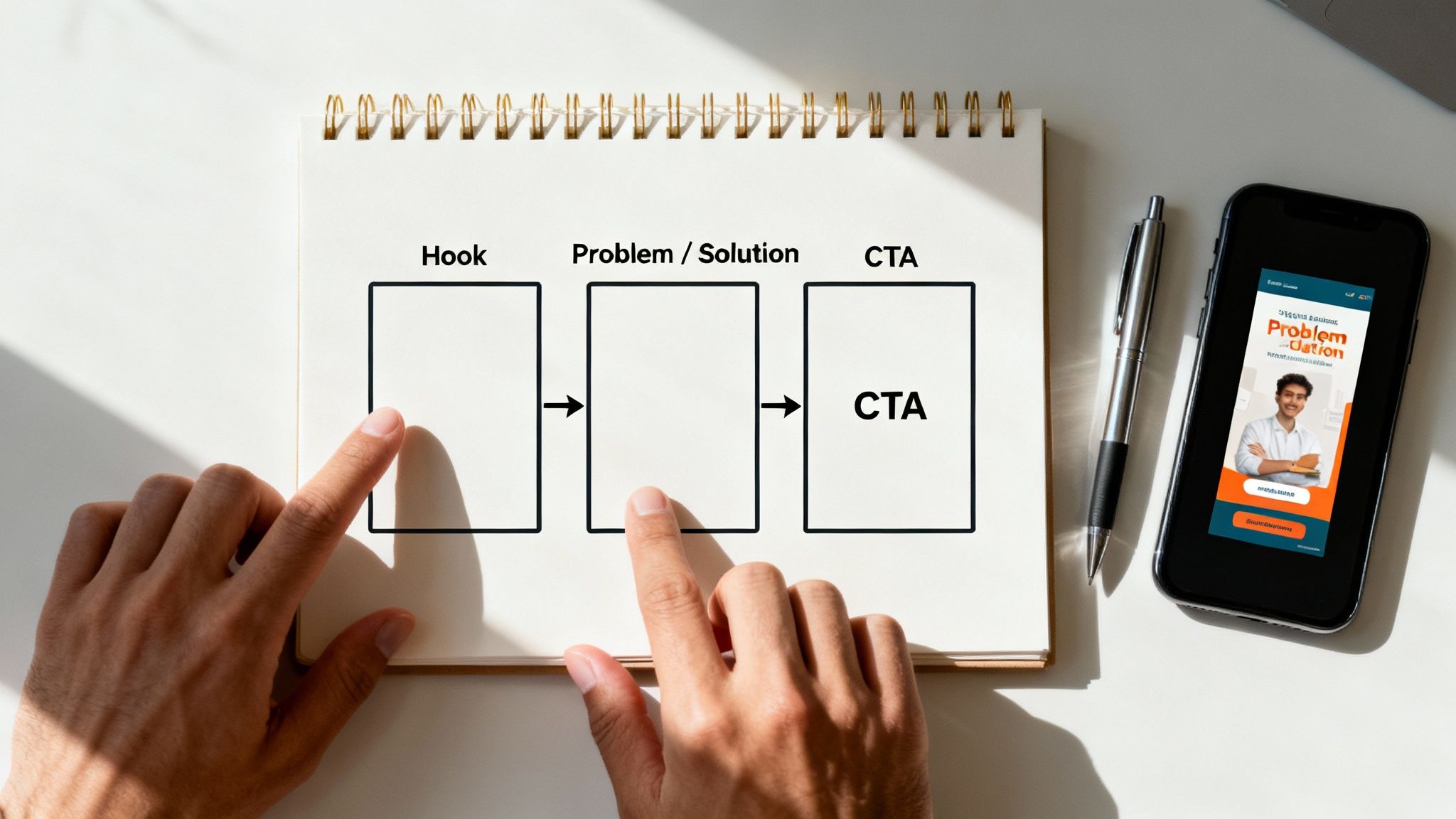
You don't need a Hollywood-level script. A simple, time-tested framework is all it takes to structure your ad for impact and guide your AI prompts. I always break my ads down into three essential parts:
- The Hook (0-3 seconds): You have to stop the scroll. Period. This is your first, and maybe only, chance to grab their attention. It needs to be visually arresting and make them curious.
- The Problem/Solution (3-13 seconds): Quickly tap into a pain point your audience feels, then immediately position your product as the hero that solves it. It’s all about showing, not just telling.
- The Call-to-Action (13-15 seconds): Tell them exactly what to do next. Be direct. Use clear, action-oriented phrases like "Shop Now," "Learn More," or "Get Yours Today."
Pro Tip: When you're writing prompts for the AI, specificity is king. Don't just ask for "a woman enjoying coffee." Instead, try: "close-up shot of a woman smiling as she sips a steaming latte in a cozy, sunlit cafe." That level of detail is what gives the AI the concrete direction it needs.
Let's stick with our sustainable sneaker brand and see how this plays out in practice.
- Hook Scene: Extreme close-up on a stylish, eco-friendly sneaker stepping into a vibrant green puddle, splashing water in slow motion.
- Problem/Solution Scene: Quick cuts showing someone wearing clunky, unfashionable "eco" shoes, then transitioning to them confidently striding in the sleek, new sneakers.
- CTA Scene: The shoe is displayed beautifully with the text overlay "Style That Feels Good. Shop Now."
Boom. Just like that, you have a clear storyboard. You can take these exact scene descriptions and feed them directly into an AI video generator like Saro2 to start bringing your ad to life. For a deeper look at the whole process, check out our full guide on how to create video ads that work.
Writing Prompts That Create Incredible Video Ads
This is where the magic really happens. The partnership between you and your AI video generator for ads is a creative one, but remember: the AI can only work with what you give it. Vague prompts will get you generic, forgettable videos. Detailed, descriptive prompts? That's how you get stunning, on-brand content that actually converts.
Think of yourself as a film director giving very specific instructions to your cinematographer. You need to paint a picture with your words. Getting this right is what separates the amateur-looking stuff from professional-grade ads that stop people mid-scroll.
A Prompt Formula That Just Works
After a lot of trial and error, I've landed on a core formula that consistently gets great results from AI tools like Saro2. It forces you to think through the essential building blocks of a great shot, leaving nothing to chance.
The formula is: Style + Subject + Action + Environment + Camera Shot.
Let’s walk through it with an example. Say we're making an ad for a new energy drink.
-
Style: First, set the vibe. Are we going for cinematic, vibrant, retro VHS, minimalist, dramatic lighting? For our energy drink, let's go with "energetic and vibrant."
-
Subject: Who or what is the star of the shot? Don't just say "a person." Get specific. Something like a young female athlete with a determined expression is much better.
-
Action: What’s happening? Be descriptive. Instead of "running," let's try sprinting up a steep city staircase.
-
Environment: Where is all this taking place? Context is key. Let’s place her at sunrise, with the city skyline in the background.
-
Camera Shot: How do you want the shot framed? This is huge for making your video look professional. You could use a dynamic low-angle shot, close-up, slow-motion tracking shot. Let's go with a "dynamic low-angle shot."
So, what’s our final prompt? Energetic and vibrant, a young female athlete with a determined expression sprinting up a steep city staircase at sunrise, with the city skyline in the background, dynamic low-angle shot.
See how much information is packed in there? You're giving the AI everything it needs to create a powerful, compelling visual that perfectly matches your vision.
Key Takeaway: Treat every part of the prompt formula as a layer of detail. The more layers you add, the richer and more specific your video clip will be. A solid prompt is the blueprint for a killer AI-generated ad.
Getting your prompts right is the foundation of creating compelling AI video. To help you structure your ideas, here’s a breakdown of the key components that I’ve found work best.
Effective AI Video Prompt Formulas
| Component | Description | Example |
|---|---|---|
| Style | Defines the aesthetic, mood, and visual tone. | Cinematic, minimalist, hyperrealistic, 90s vintage film |
| Subject | The main person, object, or character in the scene. | A golden retriever puppy, a sleek silver sports car |
| Action | What the subject is doing. This should be a clear verb. | ...jumping through a field of flowers, ...racing down a winding road |
| Environment | The setting or background where the action occurs. | ...under a bright blue sky, ...at night with neon city lights |
| Camera Shot | The camera angle, movement, or framing of the scene. | Close-up shot, wide-angle drone shot, slow-motion tracking shot |
Using these components together gives the AI a clear and detailed roadmap, which is exactly what you need to move beyond generic clips and start producing truly unique visuals for your ads.
Turning Simple Words into Motion
The text-to-video feature is your go-to for building scenes from scratch. It's how you’ll create the narrative of your ad, from the opening hook to the final call to action. By using the prompt formula, you can generate a whole series of clips that fit together perfectly for your storyboard.
For example, after that first stair-climbing scene, your next prompt could be something like: Cinematic close-up on the athlete's face, sweat beading on her forehead, she smiles with a look of accomplishment. This creates a natural progression, building a real story one detailed prompt at a time. The creative options are nearly endless, and you can dive deeper into the tech with our guide on free text-to-video AI tools.
Animating Your Product Photos
For anyone running a Shopify store or any e-commerce brand, the image-to-video function is a total game-changer. Seriously. You can upload a static product photo and use a prompt to bring it to life or build a whole new scene around it. It makes your products feel so much more dynamic.
Imagine you've got a clean product shot of a new wristwatch on a plain white background. You could upload that image to Saro2 and feed it a prompt like this:
- Prompt Example: Animate this watch with a subtle lens flare sweeping across the watch face, place it on a background of a rugged mountain peak at sunset, add gentle dust particles floating in the air.
Just like that, your boring product photo becomes a dramatic, high-end ad. This is an incredible way to generate an endless stream of new ad creatives from your existing photo library, which saves a ton of time and money.
Putting It All Together: From Clips to a Cohesive Ad
Getting that one perfect AI-generated clip feels great, but let's be real—a single clip isn't an ad. Great ads tell a story, and using an AI video generator for ads to build that narrative is where your strategy truly shines. The real goal is to string those incredible, isolated moments into a sequence that pulls your viewer in and pushes them toward a specific action.
This is exactly why the storyboard (or multi-scene) feature in a tool like Saro2 is so powerful. Think of it as your virtual editing suite. It lets you generate, arrange, and tweak every part of your ad until the story flows perfectly from one scene to the next.
Building Your Story, One Scene at a Time
Forget trying to write one massive, complicated prompt for your entire ad. That's a recipe for confusing the AI and getting messy results. The smarter approach is to think like a director and build your ad with individual shots.
Generate each part of your script—the hook, the problem, the solution, and your call-to-action—as its own separate scene. This gives you way more control and flexibility.
Let’s say you’re creating an ad for a new travel backpack on your Shopify store. Here’s how you could break it down:
- Scene 1 (The Hook): Prompt for a dynamic, fast-paced shot of a traveler rushing through a crowded airport, looking stressed.
- Scene 2 (The Problem): Next, generate a close-up shot of an old, bulky backpack bursting at the seams.
- Scene 3 (The Solution): Now for the hero shot. Create a smooth, slow-motion reveal of the sleek, new backpack, perfectly organized.
- Scene 4 (The CTA): Finally, prompt a shot of a happy traveler easily sliding the backpack under an airplane seat, with text overlay: "Travel Smarter. Shop Now."
By creating these as four distinct clips, you can nail the visuals for each part of your story before you even think about stitching them together. It’s a much cleaner process.
The image below breaks down the key ingredients of a strong prompt, which you'll use for every single scene you create.
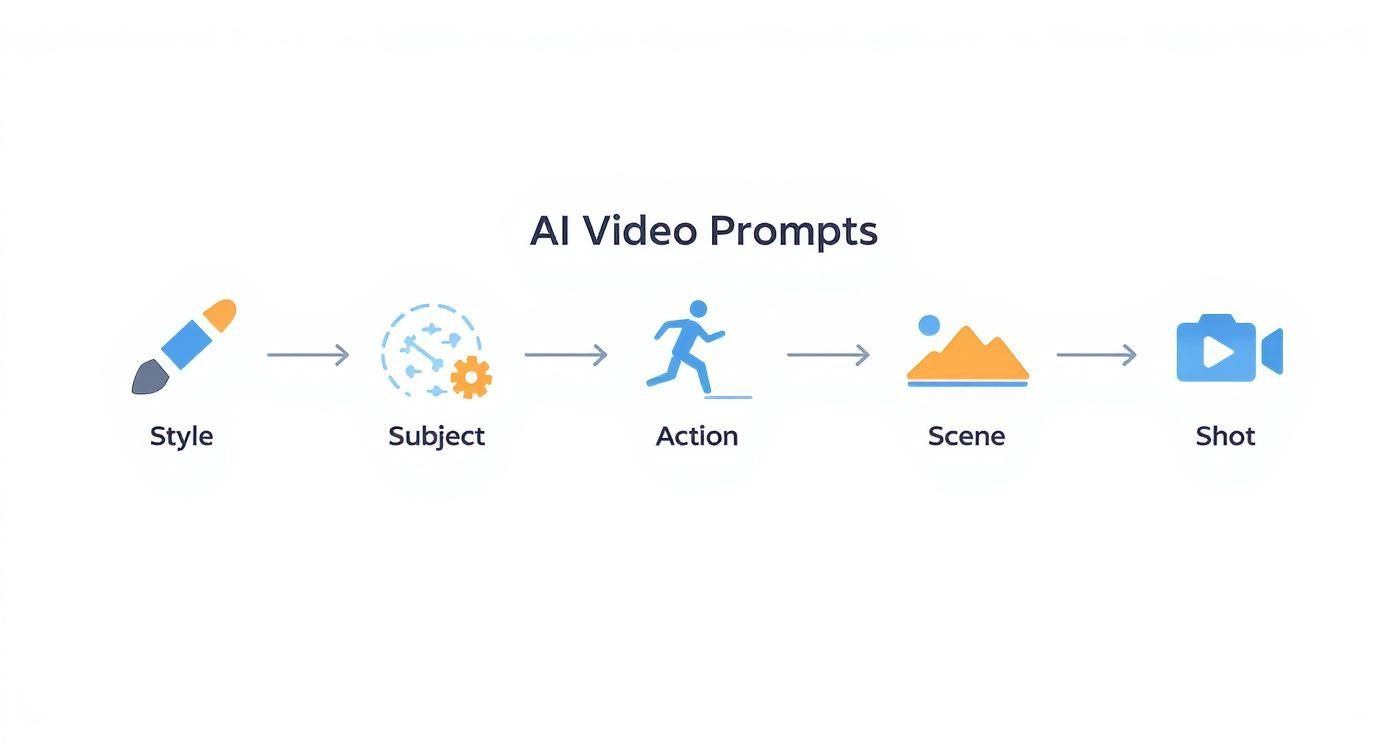
As you can see, blending these elements—style, subject, action—is what gives you precise control over the final output.
The Human Touch: Pacing and Polish
Once your scenes are generated and laid out in order, it's time for the final, human-led edit. This is where you turn raw AI output into a polished, high-converting ad. And honestly, the most important element here is pacing.
The right pace depends entirely on the platform. For a TikTok ad, you need lightning-fast cuts. I'm talking scenes that last less than a second to keep thumbs from scrolling. But for a product video on your Shopify page? You can slow down a bit, letting the shots breathe to showcase key features. The AI gives you the raw footage, but you control the rhythm.
The real art of using an AI video generator for ads isn't just about writing clever prompts. It's in the final edit. The AI is your incredibly fast creative partner, but you're still the director making the final calls on pacing, music, and messaging.
Text overlays are another non-negotiable. Keep them short, punchy, and super readable on a phone screen. Your text should add context or highlight a benefit, not just state what's already obvious in the video.
Finally, layer in background music or an AI-generated voiceover that matches your brand’s vibe. An upbeat track might be perfect for a fitness product, while a calm, melodic tune works better for a wellness app. These final touches are what will elevate your AI-generated video into an asset that actually drives sales.
A Practical Guide to A/B Testing Your AI Ads
Getting that first great ad out the door feels like a huge win, but it’s really just the starting line. The real magic of using an AI video generator for ads kicks in when you start testing. AI's knack for cranking out variations at incredible speed turns A/B testing from a slow, expensive headache into a fast-paced, data-backed strategy.
Think about it. Instead of burning weeks and a pile of cash on a reshoot, you can whip up a dozen different ad versions in a single afternoon. This is how you find out what really connects with your audience, turning a decent campaign into a killer one and getting the most out of every dollar you spend.
Building Your Testing Framework
Good testing doesn't happen by accident; it starts with a solid plan. First, you need your control video. This is your original ad, the benchmark everything else will be measured against. Once that's set, the golden rule is to change only one single element at a time for each new version.
I can't stress this enough. If you change the hook, the music, and the call-to-action all at once, you'll be staring at your analytics with no clue which change actually moved the needle.
From my experience, these four variables pack the biggest punch and are the best place to start:
- The Opening Hook (First 3 Seconds): Try a completely different visual or opening line. This is your first impression, so make it count.
- The Visual Style: Generate a variation with a different vibe. Maybe switch from a polished, "cinematic" look to something that feels more like authentic "user-generated content."
- The Call-to-Action (CTA): Play around with the text overlays or voiceover commands. Does "Shop Now" outperform "Learn More"? You won't know until you test it.
- The Background Music: A simple audio track swap can completely change the mood and energy of your ad.
This disciplined, one-change-at-a-time approach gives you clean, actionable results you can actually learn from.
Monitoring the Right Performance Metrics
As you roll out these variations, it’s crucial to watch the right numbers. Don't get distracted by metrics that look nice but don't mean much. You need to focus on the Key Performance Indicators (KPIs) that directly affect your business goals.
The point of A/B testing isn't just to find one "winning" ad. It's to build a deep, ongoing understanding of what your audience wants. This creates a powerful feedback loop that makes every campaign you launch smarter than the last.
For most campaigns, especially if you're running ads for a Shopify store or on TikTok, these are the metrics that truly matter:
- Click-Through Rate (CTR): This tells you flat out if your creative is grabbing attention. A higher CTR means your hook and visuals are doing their job.
- Cost Per Acquisition (CPA): This is the bottom line. How much are you paying to land a new customer? A lower CPA means your ad is more profitable, plain and simple.
- Conversion Rate: Of the people who clicked, how many actually followed through and made a purchase? This tells you how well the ad and your landing page work together.
The numbers back this up. This kind of rapid A/B testing, powered by AI video generation, can increase ad performance by 33%. Plus, AI tools let advertisers create up to 10 times more video ads than with traditional methods, giving you a massive advantage in finding what works. Discover more insights about AI's impact on video advertising to see the full picture.
When you use a tool like Saro2, you’re not just making ads—you’re building an optimization engine for your entire marketing strategy.
Common Questions About AI Video Generators for Ads
Whenever I talk to marketers who are just dipping their toes into AI video, the same handful of questions always come up. It's totally understandable—this tech is new and moves fast. Let's break down those common concerns so you know exactly what you're getting into.
Can AI Really Match My Brand’s Style?
Yes, but think of yourself as the director, not just a passenger. The AI needs your creative input to get it right.
The key is getting specific in your prompts. Instead of just saying "a product video," guide the AI with terms like "minimalist aesthetic with clean lines," "vibrant and energetic color palette," or "moody, cinematic lighting for a premium feel." The more detail you feed it, the closer it gets to your vision.
Tools like Saro2 take this a step further by letting you save style presets. This is a game-changer for brand consistency. Once you dial in a look you love, you can apply it to all future ads without having to reinvent the wheel every single time.
AI is your creative co-pilot, not the pilot. Your prompts and final edits are what truly shape the video to fit your brand's unique fingerprint.
What Are the Biggest Limitations I Should Know About?
AI video is powerful, but it's not magic—at least, not yet. You'll find it sometimes struggles with a few specific things. Getting crisp, legible text baked directly into a video clip can be tricky, and portraying very specific or subtle human emotions is still a work in progress.
Another common hurdle is character consistency. Getting the exact same person to appear across several different scenes can be a challenge.
Because of this, my workflow is to lean on the AI for what it does best: creating stunning, eye-catching visual clips. Then, I jump into a simple editor to add my text overlays, logos, and other finishing touches. That final human polish makes all the difference.
How Do I Handle Music and Voiceovers?
This part is actually pretty straightforward. Most good AI video platforms come with built-in libraries of royalty-free music, so finding a track that matches your ad's vibe is usually just a few clicks away.
For the voiceover, you've got options. You can record it yourself, hire a pro on a site like Fiverr and upload the audio file, or use the platform's own text-to-speech AI voices.
I’ve found that using the AI voices is incredibly handy for A/B testing different scripts quickly and on a budget. If you have more questions like these, you can always find more in-depth answers in our official FAQ section.
Ready to create stunning video ads in minutes? Saro2 gives you the power to generate cinematic, high-converting ads with simple text prompts. Start creating for free today at https://saro2.ai.