8 Essential Tips for Creating Pro Videos with the Sora 2 AI Video Generator
Unlock professional results with our top 8 video editing tips for beginners. Learn how to leverage Sora 2 for cinematic videos that drive engagement.
Welcome to the new era of video creation where anyone can produce cinematic content. As a beginner, video editing can seem daunting, but with powerful AI tools like the Sora 2 video generator, the learning curve has never been flatter. This guide provides actionable tips for beginners, specifically tailored for creating high-impact visuals using Sora 2. We'll move beyond generic advice and focus on professional techniques you can apply to your AI-generated videos today.
To start your journey, one of the first decisions is selecting the right tools; explore options for the best video editing software for beginners to find a platform that complements your AI workflow. Once you have your software, this article will show you how to master everything from foundational J-cuts and L-cuts to strategic color grading, ensuring your brand stands out.
Crucially, we'll demonstrate how to leverage Sora 2's text-to-video and storyboard generation capabilities to elevate your projects. You will learn how to write effective Sora 2 prompts, reduce production time, and create stunning, professional-quality videos for TikTok ads, ecommerce product showcases, and compelling social media campaigns. Let's dive into the techniques that will transform your AI-generated clips into polished, engaging content.
1. Master J-Cuts and L-Cuts for Professional Transitions Between Sora 2 Clips
One of the most effective tips for editing AI-generated video is to move beyond simple, hard cuts. Instead of aligning your Sora 2 audio and video clips to start and end at the exact same time, try staggering them. This is the core principle behind J-cuts and L-cuts, two foundational techniques that instantly make your videos feel more professional and cinematic. They create a seamless flow that guides the viewer's attention and eliminates jarring transitions between AI-generated scenes.
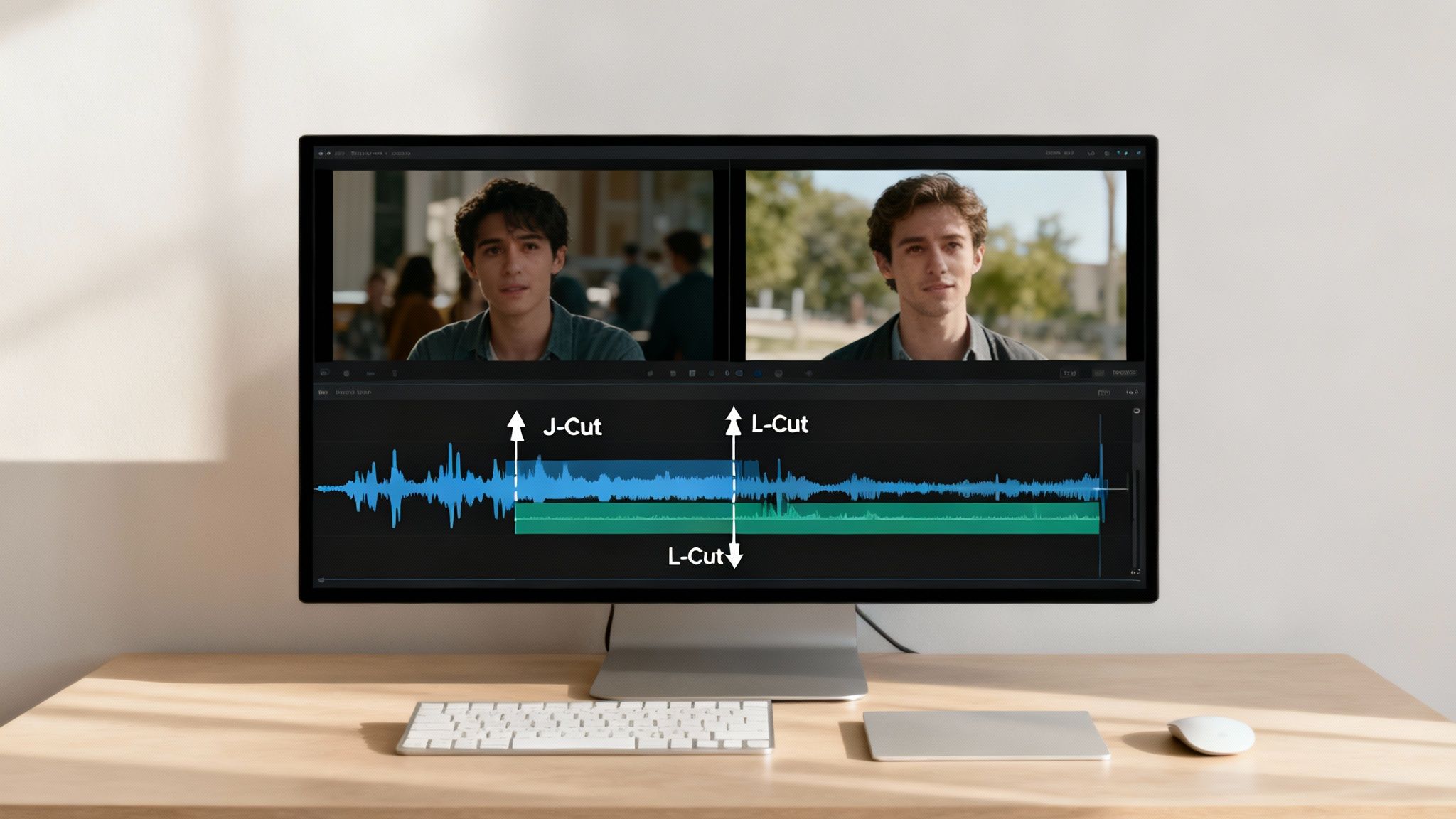
In a J-cut, the audio from the upcoming Sora 2 clip begins before the video appears. This technique builds anticipation and smoothly introduces the next scene. Conversely, an L-cut lets the audio from the previous clip continue playing for a moment after the video has already cut to the next shot, creating a lingering emotional impact or connecting two related ideas.
How to Implement J-Cuts and L-Cuts with Sora 2 Video Examples
Applying these cuts is simpler than it sounds and works exceptionally well with AI-generated content. If you're using the Sora 2 text-to-video generator for a product ad, you can generate separate clips for the unboxing and the product in use.
- For a J-Cut: Let the sound of the product being used start one second before you visually cut from the unboxing clip. This creates a powerful "reveal" effect.
- For an L-Cut: Show the product in action, then cut to a shot of a satisfied customer's face while the audio of the product continues to play softly in the background.
Pro Tip: Start with subtle overlaps of 0.5 to 1 second. The goal is to create a transition that feels natural, not one that calls attention to the editing itself. Test these cuts on mobile platforms like TikTok, as Sora 2 for TikTok ads benefits greatly from this seamless flow. For those looking to dive deeper into advanced editing techniques, you can explore more resources on AI-powered video creation. You can get familiar with the J-Cut and L-Cut for professional transitions on saro2.ai.
2. Use Consistent Color Grading to Establish Brand Identity with Sora 2 Videos
Beyond basic cuts, color is one of the most powerful tools in your editing arsenal. Color grading is the process of adjusting and enhancing colors in your Sora 2 video footage to achieve a specific look, mood, or feeling. For business owners and content creators, this is not just an artistic choice; it's a branding strategy. Consistent color grading creates a recognizable visual style that strengthens brand identity, making your content instantly familiar to your audience on platforms from TikTok to your Shopify storefront.
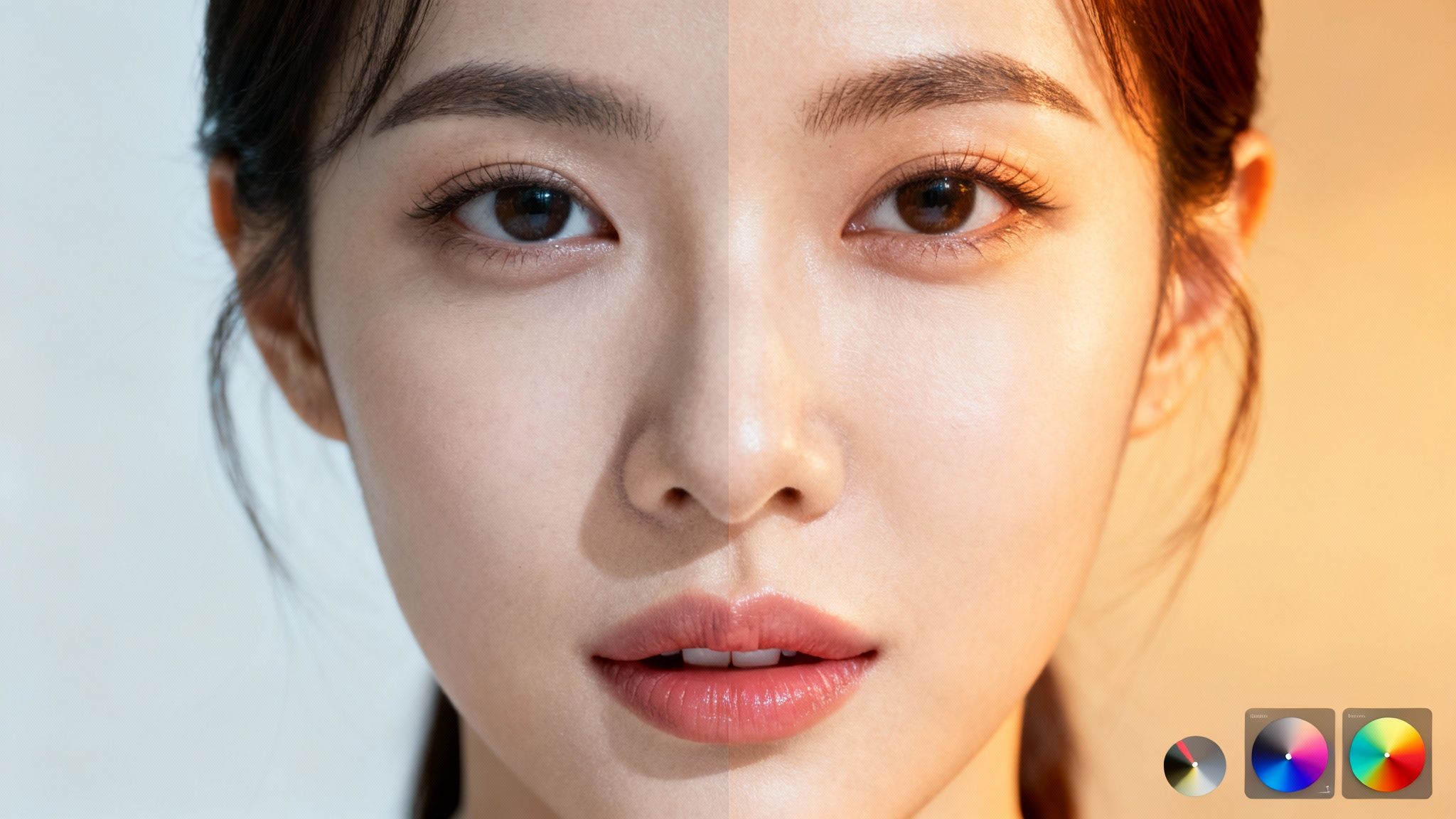
Think about how major brands use color. Tesla's promotional videos often use a cool-toned, high-contrast palette that feels futuristic and sleek. In contrast, a beauty brand like Glossier uses a warm, saturated aesthetic that feels personal and inviting. This visual signature makes their content stand out in a crowded feed. By developing a consistent color palette for your Sora 2 for ecommerce videos, you build an immediate, subconscious connection with your viewers.
How to Implement Consistent Color Grading on AI Videos
Establishing a signature look is straightforward, especially when using Sora 2. You can even include color instructions in your Sora 2 prompts to get a head start.
- Create a Template: Develop 2-3 signature color grades and save them as presets or templates in your editing software. This dramatically speeds up your workflow and ensures every Sora 2 video is on-brand.
- Use LUTs as a Base: Look Up Tables (LUTs) are a great starting point. Apply a cinematic LUT that fits your brand's vibe to your Sora 2 video examples, then tweak the saturation and contrast to make it uniquely yours.
- Unify Your Footage: If you mix AI and camera footage, apply your custom color grade to both your Sora 2 generated clips and your own shots. This creates a seamless, professional final product.
Pro Tip: Always apply color grading as the final step in your editing process, after you've locked your cuts. Most viewers will watch on mobile, so check your colors on a phone screen. Getting this right is a crucial AI video marketing strategy for building a strong brand presence. You can delve into more resources on how to Use Consistent Color Grading to Establish Brand Identity on saro2.ai.
3. Use the Sora 2 Storyboard Generator to Plan B-Roll and Enhance Storytelling
One of the most impactful tips for beginners is learning to use B-roll footage effectively. B-roll is supplementary footage intercut with the main shot (A-roll). Instead of showing a single, continuous take, you strategically layer in visuals of products, locations, or close-up actions to make your video more dynamic. This is where the Sora 2 storyboard generator becomes a game-changer, allowing you to plan and create perfect B-roll clips on demand.
For Shopify store owners or TikTok sellers, B-roll is what separates a basic video from a compelling ad. It’s the close-up shot of the product's texture or the lifestyle scene showing it in use. The Sora 2 video generator can create these high-quality clips from a simple text prompt, saving you time and money compared to traditional shoots.
How to Implement Strategic B-Roll with Sora 2
Using B-roll is a straightforward way to elevate your content. If your A-roll is a person talking about a new product, use Sora 2 prompts to generate B-roll that fills in the visual story.
- Hide Jump Cuts: If you edit out a pause from your speaking footage, it creates a "jump." Cover this jump by placing a 2-3 second B-roll clip generated by Sora 2 over the cut.
- Demonstrate a Point: As you describe a key feature, cut to a Sora 2 generated close-up shot of that feature in action. This reinforces your message visually.
- Set the Scene: Use Sora 2 to generate beautiful, atmospheric shots of an environment related to your product, such as a cozy coffee shop or a sunny beach, to enhance the mood of your video.
Pro Tip: Keep your B-roll shots short and sweet, especially for mobile platforms like TikTok. Aim for clips that are 2-3 seconds long to maintain a quick, engaging pace. A well-placed Sora 2 video example can make the difference between a viewer scrolling past or stopping to watch. For more advanced strategies on visual storytelling, you can explore detailed resources about implementing strategic B-roll to hide cuts and enhance storytelling on saro2.ai.
4. Master Audio Levels and Mixing for Professional Sora 2 Product Videos
One of the most crucial tips for beginners is understanding that audio quality is just as important as video quality. Your Sora 2 video examples may be visually stunning, but viewers will quickly click away from a video with unclear or unbalanced sound. Audio mixing is the art of balancing dialogue, music, and sound effects to create a professional soundscape that captivates your audience.
Proper audio mixing involves setting the correct levels for each element. For instance, in a Sora 2 product video, the voiceover needs to be prominent, while the background music should add atmosphere without overpowering it. Getting this balance right is what separates amateur content from polished, professional productions that drive sales and engagement.
How to Implement Professional Audio Mixing
Achieving a clean audio mix is straightforward with a few key guidelines. This is especially vital when adding voiceovers or sound effects to videos created with the Sora 2 text-to-video tool, as the AI-generated visuals need a strong audio foundation to feel complete.
- Set Dialogue Levels First: Your primary audio, usually a voiceover, should be the loudest element. Aim for its peaks to hit between -6dB and -3dB on your audio meter to avoid distortion.
- Balance Background Music: Once your dialogue is set, adjust your background music. A good rule of thumb is to set it about 15dB to 20dB lower than your dialogue.
- Use Sound Effects (SFX) Thoughtfully: SFX should enhance the video, not distract from it. Place them on a separate track and adjust their volume to complement the action on screen.
Pro Tip: Always check your final mix on multiple devices before publishing. Listen on your phone speaker, laptop, and a pair of headphones. Consistent audio quality is a hallmark of a professional AI video marketing strategy. To learn more about how to create compelling videos from start to finish, you can explore additional resources for professional audio and video creation.
5. Use Text Overlays to Communicate Key Messages in Sora 2 TikTok Ads
One of the most powerful tips for beginners is learning how to communicate effectively without sound. Text overlays and titles are essential for grabbing attention, especially since much of social media video is watched on mute. For Sora 2 for TikTok ads, well-placed text can be the difference between a scroll and a sale, ensuring your message lands even when the audio is off.
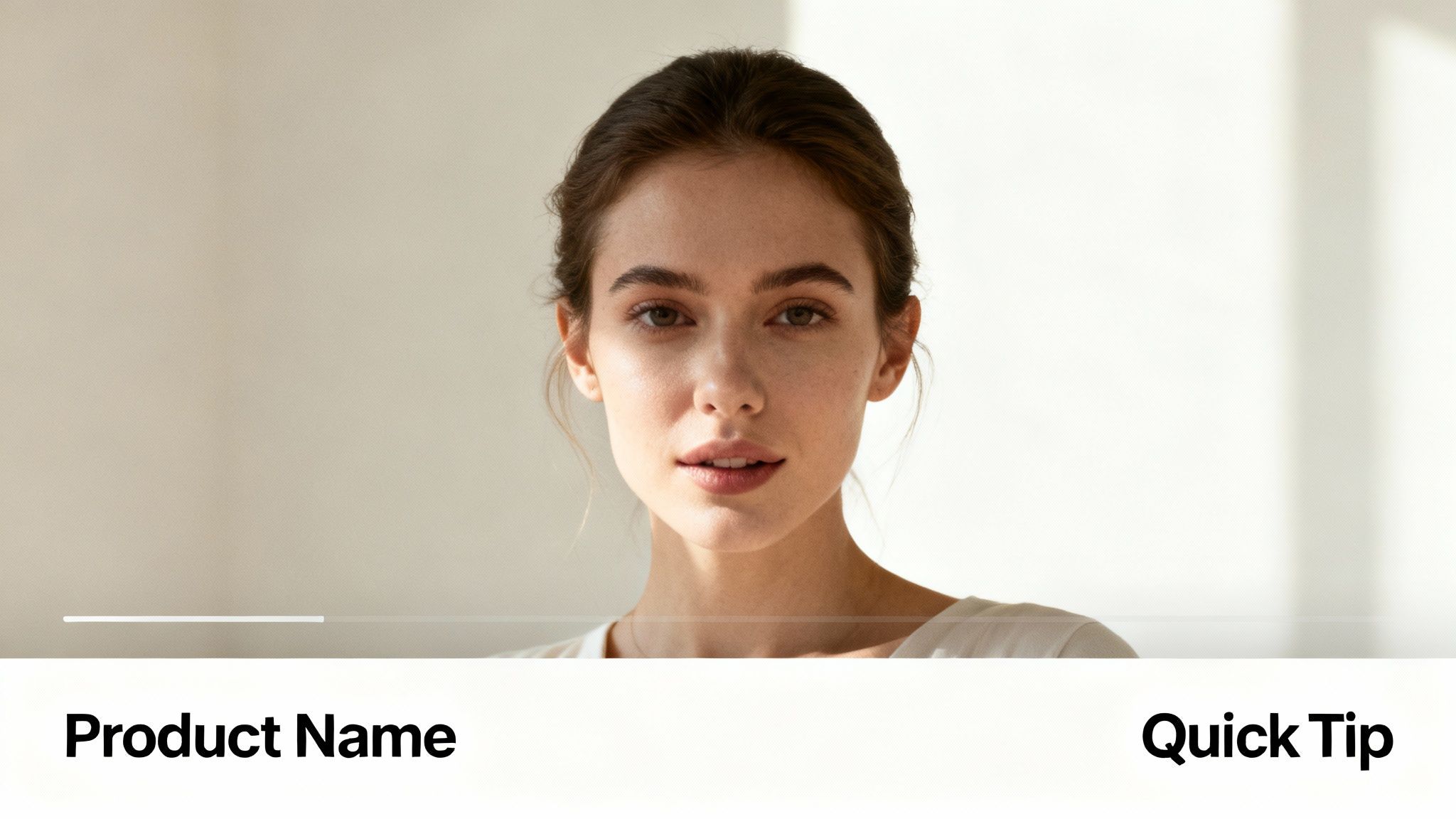
A text overlay is any text that appears over your video footage, often used for hooks or to emphasize a point. A lower third is a specific type of text graphic placed in the lower area of the screen, typically used to display a product name and price. This technique is vital for clarity and conversions in ecommerce and product videos.
How to Implement Text Overlays and Lower Thirds
Strategic text placement guides the viewer's focus and reinforces your video's core message. When using the Sora 2 video generator for a product demonstration, you can enhance the visuals with clear, concise text that highlights benefits.
- For a Text Overlay: As your Sora 2 video shows a new feature, add a bold text overlay that says "3x Faster Performance" to immediately communicate the value.
- For a Lower Third: When showcasing a product, use a clean lower third to display the product name and price, making the call-to-action clear for Sora 2 for ecommerce ads.
Pro Tip: Keep text on-screen for at least 2 to 4 seconds to ensure readability. Use high-contrast colors and a simple, sans-serif font. To hook viewers instantly, use compelling power words in your overlays within the first three seconds of the video. Discover more strategies to effectively use text overlays and lower thirds to communicate key messages on saro2.ai.
6. Apply Compositional Principles When Editing Your Sora 2 Videos
Even if an AI-generated clip isn't perfectly framed, you can dramatically improve its visual appeal in the editing suite. One of the most powerful tips for beginners is applying the rule of thirds. This fundamental principle involves dividing your frame into a 3x3 grid and placing key subjects along these lines or at their intersections. This creates a more balanced, dynamic, and professional-looking composition.
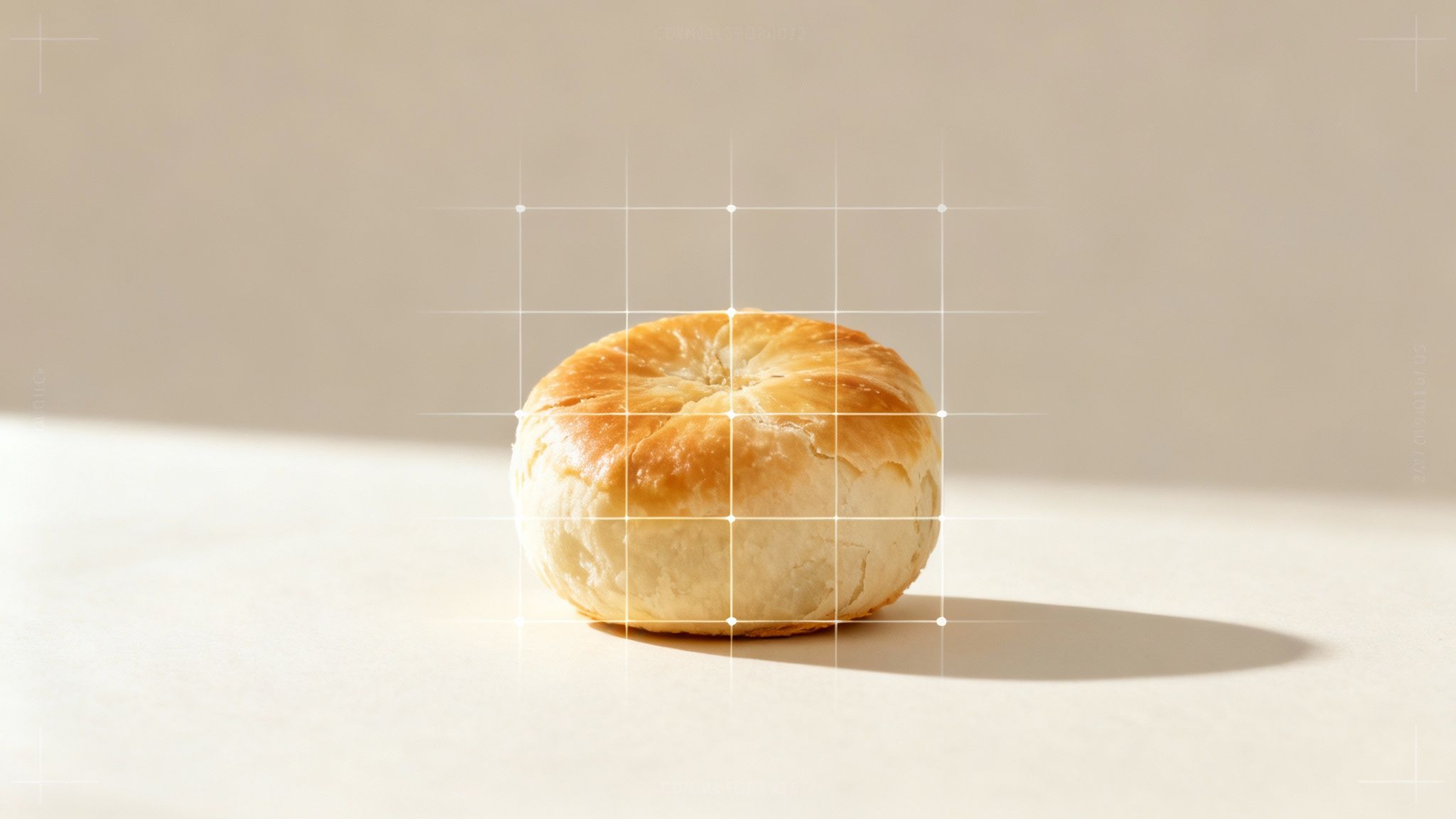
The rule of thirds moves the focus away from the dead center of the frame. By positioning a product or a key focal point off-center, you create visual interest. This is especially crucial for Sora 2 for ecommerce and product videos, where guiding the viewer's attention to specific features is key to making a sale. You can refine the composition of clips from the Sora 2 video generator to maximize their impact.
How to Implement the Rule of Thirds in Post-Production
Most modern video editing software includes a grid overlay that you can toggle on to help you reframe your Sora 2 clips.
- Reframing Product Shots: Generate a product video using Sora 2. In your editor, use the crop and scale tools to reposition the product so it sits on one of the grid's vertical lines.
- Enhancing Testimonials: When editing a customer testimonial, crop the shot so the person's eyes align with the top horizontal line. This creates a stronger connection with the viewer.
- Adding Motion: Combine this rule with the Ken Burns effect. Set a slow pan or zoom that moves a subject from one intersection point to another, adding subtle, professional motion.
Pro Tip: Use the rule of thirds not just for your main subject but also for placing text overlays. Aligning your call-to-action with these compositional lines ensures it feels integrated and balanced. You can master compositional principles for your AI videos at saro2.ai.
7. Cut on Action to Create Invisible Transitions Between Sora 2 Video Examples
One of the most powerful tips for beginners is learning how to "cut on action." This technique involves making an edit at the peak of a subject's movement, like a person turning their head or a product being lifted. The motion itself disguises the cut, creating a seamless, invisible transition that keeps the viewer engaged.
Cutting on action is particularly effective when blending multiple Sora 2 text-to-video sequences into a cohesive narrative. The continuous motion carries the viewer's eye across the edit point, making the transition feel entirely natural. This method is a staple in professional filmmaking and is essential for maintaining rhythm and flow in your AI video marketing campaigns.
How to Implement Cutting on Action with Sora 2
Applying this technique is straightforward and adds a layer of polish to any project. You can write Sora 2 prompts to generate clips with specific actions to facilitate this editing style.
- For Product Unboxings: When generating an unboxing video with Sora 2, create one clip of a hand reaching for the box and another of the hand lifting the lid. Cut from the first clip to the second right as the hand begins its upward motion.
- For Tutorials or Demos: In a cooking tutorial generated by Sora 2, cut from a wide shot of ingredients to a close-up just as the chef starts pouring. The action becomes the bridge that connects the two shots.
Pro Tip: To make this technique work flawlessly, generate multiple angles of the same action using different Sora 2 prompts. When editing, identify the most dynamic point of movement and place your edit slightly after the action begins. This makes the transition feel completely organic. To practice combining AI-generated clips seamlessly, you can learn more about how to use the Sora 2 storyboard generator on saro2.ai.
8. Optimize Sora 2 Videos for Platform-Specific Requirements
One of the most critical tips for beginners is to create content with the final platform in mind. A video that looks stunning on YouTube might be awkwardly cropped on TikTok. Each platform has unique specifications for aspect ratios and lengths, and optimizing your Sora 2 video for these requirements is essential for maximizing reach and engagement.
For small business owners, this means tailoring your Sora 2 for ecommerce videos to each platform. A vertical 9:16 video is perfect for a product page or TikTok ad, while a 16:9 version is better for YouTube. Tailoring your edits signals a higher level of polish and attention to detail.
How to Implement Platform-Specific Optimization
Optimizing your videos is a straightforward process. When generating content with a Sora 2 style model, you can prompt for specific aspect ratios from the start or generate a high-resolution master clip that can be reframed later.
- For TikTok & Reels: Edit your project in a 9:16 vertical aspect ratio. Keep the total length under 60 seconds and ensure the most crucial visual hook appears within the first three seconds.
- For YouTube: Use the standard 16:9 horizontal format.
- For Instagram & Facebook: Use 9:16 for Reels and Stories, but a 4:5 vertical format often performs best for feed posts. To ensure your videos are properly displayed across different placements, understanding the specific Facebook video ad size requirements is essential.
Pro Tip: Always leave "safe zones" by keeping important text and graphics away from the extreme edges of the frame. This prevents platform UIs from covering your key content. Generate a 16:9 master project in Sora 2, then duplicate it to create and export separate vertical versions for mobile platforms.
8 Essential Sora 2 Video Tips Comparison
| Item | Implementation Complexity 🔄 | Resource Requirements ⚡ | Expected Outcomes ⭐📊 | Ideal Use Cases 💡 | Key Advantages 📊 |
|---|---|---|---|---|---|
| Master the J-Cut and L-Cut for Professional Transitions | 🔄 Medium — precise audio/video sync required | ⚡ Low — standard NLE with multi-track audio | ⭐ High — smoother, cinematic transitions; better engagement | 💡 Scene intros, product reveals, testimonials | 📊 Reduces jarring cuts between Sora 2 clips; enhances narrative flow |
| Use Consistent Color Grading to Establish Brand Identity | 🔄 High — color theory and matching across clips | ⚡ Medium‑High — grading software, calibrated monitor, LUTs | ⭐ High — recognizable visual style; perceived production boost | 💡 Branding, Sora 2 for ecommerce, cohesive feeds | 📊 Strengthens brand recognition; improves viewer retention |
| Use the Sora 2 Storyboard Generator for B-Roll | 🔄 Medium — planning and timing for cut coverage | ⚡ Medium — Sora 2 credits, storage and organization | ⭐ High — masks errors; adds context and pacing variety | 💡 Product demos, unboxing, Sora 2 for TikTok ads | 📊 Conceals jump cuts; increases engagement with AI-generated visuals |
| Master Audio Levels and Mixing for Professional Quality | 🔄 High — technical skills (EQ, compression, loudness) | ⚡ Medium — good monitors/headphones, plugins, time for mixing | ⭐ Very High — critical for clarity and viewer retention | 💡 Podcasts, tutorials, any dialogue-heavy or commercial content | 📊 Prevents distortion; ensures clarity across devices; reduces drop-off |
| Use Text Overlays to Communicate Key Messages | 🔄 Low‑Medium — design/timing practice needed | ⚡ Low — basic titling tools; design templates | ⭐ High — improves comprehension and silent viewing | 💡 Mobile/social videos, hooks, Sora 2 product videos | 📊 Conveys key info without sound; boosts accessibility and retention |
| Apply the Rule of Thirds and Compositional Principles | 🔄 Low — simple guideline, occasional cropping or pan needed | ⚡ Low — any editor with crop/transform tools | ⭐ Medium — better framing and visual interest | 💡 Sora 2 video examples, interviews, general composition | 📊 Guides viewer focus; improves perceived production quality |
| Cut on Action to Create Invisible Transitions | 🔄 Medium — precise timing and matching actions required | ⚡ Medium — multiple Sora 2 clips or camera angles | ⭐ High — seamless, energetic cuts that hide edits | 💡 Unboxing, demos, cooking, action-based tutorials | 📊 Creates invisible transitions; reduces need for stylized effects |
| Optimize Videos for Platform-Specific Requirements | 🔄 Medium — research + multiple timelines/exports | ⚡ Medium‑High — time for repurposing, multiple exports | ⭐ High — better reach, algorithm favorability, viewing experience | 💡 Multi-platform campaigns, repurposing content | 📊 Maximizes quality and engagement per platform; prevents formatting issues |
Start Creating: Your Journey with Sora 2 Begins Now
You’ve just navigated a comprehensive toolkit of foundational video editing techniques for AI-generated content. From the subtle artistry of J-cuts and L-cuts to the brand-defining power of consistent color grading, each tip serves a single purpose: to transform your Sora 2 videos into a polished, compelling narrative that captivates your audience. These are the practical building blocks used by professional editors every day to create seamless, engaging content that drives results.
Think of each principle as a lever you can pull to evoke a specific response. Mastering your audio levels ensures your message is heard clearly. Strategically placing AI-generated B-roll enriches your story, adding context and visual interest that holds viewer attention. By cutting on action and applying compositional rules, you create a viewing experience that feels intuitive and professional. These are the details that separate amateur content from videos that convert.
Bridging Traditional Editing with Sora 2 AI Video Generation
The true power of these tips for beginners is unlocked when you combine them with cutting-edge technology. The traditional video production workflow is often time-consuming and expensive. This is where the Sora 2 video generator fundamentally changes the game.
Instead of spending hours searching for stock footage or organizing a complex shoot for B-roll, you can now generate it instantly. Need a cinematic shot of a product in a specific environment? Use Sora 2’s text-to-video capabilities. Want to visualize an entire ad campaign? Use the Sora 2 storyboard generator with a simple prompt. This AI-driven approach doesn't replace your editing skills; it supercharges them. You can apply the J-cuts, color grading, and audio mixing techniques you've learned to Sora 2 video examples, achieving a professional look in a fraction of the time.
Your journey is about moving from a passive learner to an active creator. The path to mastering video editing is built on consistent practice and a willingness to integrate powerful, time-saving tools. By implementing these foundational tips and embracing the creative potential of AI with Sora 2, you are perfectly positioned to produce high-quality, engaging videos that not only look incredible but also build your brand and drive your business forward. Your next viral video is no longer a distant goal; it’s just a few well-executed edits away.
Ready to accelerate your video creation process and bring your most ambitious ideas to life? Explore the saro2 AI video generator at saro2 and discover how text-to-video technology can revolutionize your workflow, allowing you to focus on the creative editing that truly makes your content stand out.