Master the Sora 2 Product Video Generator for Ecommerce
Transform your marketing with the Sora 2 product video generator. Learn to craft high-converting videos with expert prompts, storyboards, and real examples.
If you've ever felt the pressure to create more product videos but lacked the time, budget, or crew, you're not alone. The Sora 2 product video generator is stepping in to solve exactly that problem for e-commerce brands, turning simple text ideas into stunning, cinematic videos that actually sell. Forget the hype for a moment—this guide is all about getting your hands dirty and using Sora 2 style models to make a real impact on your sales.
The Future of Ecommerce Is AI-Powered Video
For a long time, creating great video content was a major hurdle for online stores. It was expensive, time-consuming, and required serious technical skill. Now, powerful text-to-video AI is flipping the script, putting high-quality video production within reach for everyone from solo Shopify owners to in-house performance marketers.
This isn't just a minor shift; it's a fundamental change in how marketing gets done. The AI video generator market, where Sora 2 is a major player, hit a staggering USD 554.9 million in 2023. It’s expected to keep growing at a 19.9% clip, on track to reach USD 1,959.24 million by 2030. Sora 2's sweet spot is creating those short, crisp 30-60 second product videos in 1080p that perform so well on social media, all while nailing the physics to make everything look incredibly realistic.
Why AI Video Is a Game-Changer for Brands
The biggest win with a tool like the Sora 2 product video generator is the sheer speed and scale it offers. A video that would have taken a production team weeks to shoot and edit can now be dreamed up and rendered in a matter of minutes. This kind of speed means brands can jump on trends, A/B test a dozen ad concepts, or fill their product pages with compelling videos without blowing their budget.
By tearing down the old barriers to video production, AI gives small businesses and independent creators a real chance to compete with big corporations. The focus shifts from technical logistics to pure creative strategy.
As we look at how AI video is shaping e-commerce, it’s helpful to understand the broader ecosystem of top AI-driven ad creative generation tools and the role they play. Throughout this guide, we’ll get into the nitty-gritty of using Sora 2 effectively.
We'll cover:
- How to write the perfect Sora 2 prompt that brings your product to life.
- Building multi-scene storyboards that actually tell a compelling story.
- Tweaking your final videos for platforms like TikTok and Shopify.
- Practical AI video marketing strategies to get more sales and keep your audience engaged.
Building Your Strategic Foundation for Video Creation
Before you even think about writing a prompt, let's talk strategy. It’s easy to get excited and jump right into the Sora 2 product video generator, but the most stunning video in the world will miss the mark if it doesn’t speak to the right person with the right message. A little planning up front makes all the difference.
This is where you move from a vague idea—"I need a cool video for my new product"—to a focused concept designed to hit a specific business goal. Are you trying to boost conversions on a Shopify product page? Or maybe stop the scroll on TikTok? Your goal dictates the entire creative direction.
Define Your Ideal Customer
You can't sell anything if you don't know who you're talking to. Seriously. Creating a detailed customer persona is the absolute first step. This goes way beyond basic demographics; you need to get inside their head.
What are their daily frustrations? What do they aspire to? What actually triggers their decision to buy something?
Let’s imagine you’re selling a high-end, organic skincare line. Your persona might be "Sustainable Sarah," a 32-year-old professional living in the city. She cares deeply about clean ingredients and ethical sourcing. Her pain point isn’t just having dry skin; it's the challenge of finding a luxury product that aligns with her personal values.
Once you know this, you can write Sora 2 prompts that generate visuals reflecting her world. Think minimalist apartments flooded with natural light, scenes in an urban garden, or close-ups of pure, natural textures. That's how you turn a generic product video into something that resonates on a much deeper level.
Pinpoint Your Product’s Core Value
Okay, you know your customer. Now, let’s connect your product directly to their needs. Don't just rattle off a list of features. Instead, translate each feature into a tangible benefit that solves one of their specific problems. The easiest way to do this is with a simple "problem-solution" story.
Here’s a real-world example: a new portable espresso maker.
- The Problem: Your target customer is a busy commuter who’s tired of dropping $7 a day on mediocre coffee.
- The Feature: It's compact, lightweight, and battery-powered.
- The Core Value (The Solution): The freedom to enjoy a perfect, barista-quality shot of espresso on the train to work, saving both time and money.
Your Sora 2 prompts should bring that solution to life. Forget sterile product shots on a white background. Instead, you'd prompt for a scene showing a stylish person effortlessly brewing coffee on their morning commute, looking relaxed and satisfied. You’re not just selling a coffee maker; you're selling a better morning routine.
The goal is to make the viewer feel the benefit, not just see the product. Your AI video should show the 'after' state—the feeling of satisfaction, convenience, or confidence your product delivers.
Prepare Your Digital Assets for AI
The Sora 2 product video generator has incredible image-to-video features, which means the quality of your input assets is critical. Start with high-quality, well-lit product photos. If you can, use images with clean or transparent backgrounds so the product is the undisputed hero of the shot.
Get your brand assets organized in one easy-to-find folder. This little bit of prep work will save you a ton of time.
- High-Resolution Logos: You’ll need these for adding watermarks or branding in post-production.
- Brand Color Palette: Keep the hex codes handy. You can directly include them in your prompts (e.g., "...with accent colors of #1A237E and #FFD700").
- Font Information: For maintaining brand consistency in any text overlays you add later.
- Style Guide: A simple document outlining your brand's visual identity. Is it playful and vibrant, or elegant and muted?
This organization ensures every video you generate feels like a cohesive part of your brand, not a random one-off. By consistently referencing your brand's colors and mood in prompts, you’ll build stronger brand recognition. You can even use the Sora 2 text-to-video engine to create a "style reference" video that you use as a guide for all future creations.
Every product is different, and your video strategy should reflect that. A video for a tech gadget will look and feel completely different from one for a luxury fashion item.
| Strategic Approaches for Different Product Categories | | :--- | :--- | :--- | :--- | | Product Category | Recommended Video Style | Key Focus for Prompts | Example Use Case | | Tech & Gadgets | Sleek, futuristic, demo-focused | "Cinematic product shot," "user interface in action," "slow-motion detail" | Showcasing the seamless pairing of new wireless earbuds with a smartphone. | | Fashion & Apparel | Lifestyle, aspirational, editorial | "Model walking down a Parisian street," "dynamic movement," "soft natural lighting" | A short clip of a person wearing a new trench coat on a breezy, stylish city street. | | Beauty & Skincare | Clean, minimalist, results-oriented | "Macro shot of product texture," "glowing skin," "before and after transformation" | Visualizing the hydrating effect of a serum being applied to the skin. | | Home Goods & Decor | Warm, cozy, problem-solution | "Time-lapse of room organization," "sunlight streaming into a tidy living room" | A video showing how a set of storage containers transforms a cluttered pantry. |
Thinking through these categories helps you tailor your prompts from the very beginning, ensuring the AI generates footage that’s not just visually impressive but strategically on-point for your specific product.
Writing Prompts That Turn Products into Blockbusters
This is where the magic really happens. Getting the most out of a tool like the Sora 2 product video generator isn't just about typing in a command; it’s about learning to "speak" to the AI. Think of yourself as a film director. A good Sora 2 prompt is the difference between a flat, forgettable clip and a product shot that feels cinematic and genuinely makes people want to buy.
A simple "video of a watch" just won't cut it. That's a rookie mistake. You have to paint a complete picture for the AI, giving it all the details it needs to bring your vision to life—the product, the setting, the lighting, even how the camera should feel.
The Anatomy of a Killer Sora 2 Prompt
The best Sora 2 prompts are layered with detail. You're essentially building a scene piece by piece, giving the AI a rich blueprint to work from. This is how you get those hyper-realistic results that stop the scroll.
A really solid prompt almost always includes these elements:
- The Subject & Action: What is the product and what’s happening with it? Don't just say "a shoe." Say "a pristine white sneaker splashing through a puddle."
- The Setting: Where are we? Describe the background, the mood, and any other objects in the frame.
- Shot & Angle: Are we up close and personal? Or is it a wide, sweeping shot? Be specific.
- Camera Movement: Is the camera still, or is it moving? Words like "slow pan" or "dolly in" make a huge difference.
- Lighting: This is your secret weapon for setting the mood. Is it bright and airy, or dark and dramatic?
- Overall Style: What’s the vibe? "Cinematic," "hyperrealistic," "minimalist," or "vintage" are powerful keywords.
Let's put this into practice and see how it works.
Example: Crafting a Prompt for a Luxury Wallet
Let’s say you’re marketing a high-end leather wallet. Your first instinct might be to type: "video of a leather wallet on a table." Sora 2 will give you exactly that, but it'll probably feel sterile and uninspired.
Now, let's inject some life into it using our framework.
Sora 2 Prompt Example: "Cinematic close-up of a rich, dark brown leather wallet resting on a polished mahogany desk. Soft, warm light from a desk lamp highlights the intricate stitching and natural grain of the leather. The camera slowly pans across the wallet, revealing its texture. Hyperrealistic, 8k, elegant atmosphere."
See the difference? We’ve given the AI everything it needs. The shot ("cinematic close-up"), the subject ("dark brown leather wallet"), the setting ("polished mahogany desk"), the lighting ("soft, warm light"), the movement ("slowly pans"), and the aesthetic ("hyperrealistic, elegant"). The result is a video that screams quality and craftsmanship.
This level of detail is exactly why AI video is blowing up. The AI video generator market, which was valued at USD 663.46 million in 2024, is expected to hit a staggering USD 4,018.11 million by 2034. Tools like Sora 2 are at the forefront because they can take these detailed prompts and churn out stunning 30-60 second clips in minutes. This agility is a game-changer for creating ads and unboxing videos that feel both professional and timely. If you're curious, you can read the full research about the AI video generator market to see where things are headed.
Refining Your Prompts: The Iteration Game
Here’s a secret: your first Sora 2 prompt is almost never your best one. The real pros know that creating an amazing video is all about iteration. You generate a clip, see what works, and tweak your prompt to make it better.
Maybe the lighting came out too harsh. You'd change "dramatic lighting" to "soft, diffused morning light." Or perhaps the camera moved too quickly. Swap "quick zoom" for "a slow, subtle dolly-in."
Here’s a workflow I use all the time:
- Start with the Core Idea: Get the basic concept down first.
- Generate and Analyze: Watch the Sora 2 video example with a critical eye. Does it feel right?
- Find the Weak Spots: Is the background distracting? Is the angle weird? Pinpoint what's not working.
- Add More Detail: Revise your prompt with more descriptive words. Instead of "a nice background," try "a blurred background of a modern, minimalist living room with lush green plants."
- Rinse and Repeat: Keep tweaking and regenerating until you nail it. Each try will get you closer to that perfect shot.
A Cheat Sheet of Powerful Prompting Words
Having a vocabulary of descriptive words on hand is a massive advantage. These terms act like signals, telling Sora 2 exactly the kind of style and quality you're after.
| Category | Powerful Descriptive Words |
|---|---|
| Lighting | Golden hour, dramatic side lighting, soft natural light, moody, high-key, cinematic glow, ambient, backlit |
| Camera Shots | Macro extreme close-up, wide establishing shot, medium shot, over-the-shoulder, bird's-eye view, Dutch angle |
| Camera Movement | Slow pan, smooth dolly shot, tracking shot, handheld feel, static, gentle zoom-in, orbital shot |
| Aesthetics | Hyperrealistic, photorealistic, cinematic, minimalist, vintage film look, vibrant, high-fashion, sleek, organic |
| Materials/Textures | Brushed metal, polished chrome, coarse fabric, glossy plastic, natural wood grain, matte finish, dewy, translucent |
Pro Tip: Mix and match words from different categories to create incredibly specific and powerful prompts. For a new tech gadget, you might try: "A macro extreme close-up with a smooth dolly shot across a brushed metal surface, lit by dramatic side lighting for a sleek, cinematic look."
This is how you go from just using the Sora 2 product video generator to truly collaborating with it. When you give it clear, detailed, and evocative instructions, you can consistently create videos that don't just look real—they feel authentic to your brand and drive results.
Crafting Compelling Stories with the Sora 2 Storyboard Generator
A single, stunning shot is cool, but it’s the story that really sells. While the clips you can get from the Sora 2 product video generator are impressive on their own, the real magic for e-commerce happens when you start using its storyboard feature. The Sora 2 storyboard generator allows you to move beyond just one-off moments to build a complete, persuasive video with multiple scenes.
Think about it: a video that flows from one idea to the next is way more likely to keep someone watching than a bunch of random, pretty shots. This is a game-changer on platforms like TikTok, where you have about three seconds to convince someone not to scroll away. A good narrative gives them a reason to stick around.
The Classic Narrative Arc for Product Ads
You don't need to write an Oscar-worthy screenplay. For short-form ads, a simple, proven formula is your best friend. It’s designed to grab attention, show a problem, introduce your product as the solution, and then tell people what to do next.
Here’s how that four-part structure breaks down:
- The Hook (Seconds 1-3): Start with something that stops the scroll. A dramatic close-up, a surprising action, or just a visually beautiful shot will do the trick.
- The Problem (Seconds 4-10): Show the pain point. What frustration is your customer dealing with? This makes your product immediately relevant.
- The Solution (Seconds 11-25): Time for your product to be the hero. Show it in action, making it crystal clear how it solves the problem you just set up.
- The Call-to-Action (Seconds 26-30): End strong. Show your product with your logo or a final shot that nudges the viewer toward making a purchase.
When you build your storyboard around this simple arc, you create a video with purpose. It smoothly guides the viewer from being curious to becoming a customer.
Building a Cohesive Storyboard in Sora 2
Sora 2’s storyboard generator lets you line up a sequence of prompts, with each one creating a different scene. The trick is making sure all those scenes feel like they belong together. If they don't, the final video will come across as jarring and amateurish.
You need to lock down consistency in three main areas:
- Product Consistency: Your product has to look the exact same in every single shot. You can achieve this with super-specific descriptions in each prompt, but a much better way is to use the image-to-video feature with the same source image as your guide for every scene.
- Style Consistency: The vibe—lighting, colors, mood—needs to stay consistent. If you start with a scene "shot in soft, golden hour light," then make sure every other prompt in your storyboard includes that same detail.
- Tone Consistency: Keep the emotional feel the same from start to finish. A video that kicks off feeling dramatic and serious shouldn't suddenly pivot to being quirky and fun halfway through.
Think of your storyboard prompts less like individual commands and more like a single, connected script. That shift in mindset is what helps you produce a video that feels like it was put together by a professional crew, separating a good AI video from a great one.
Here’s a simple way to think about structuring each prompt to get the best results.
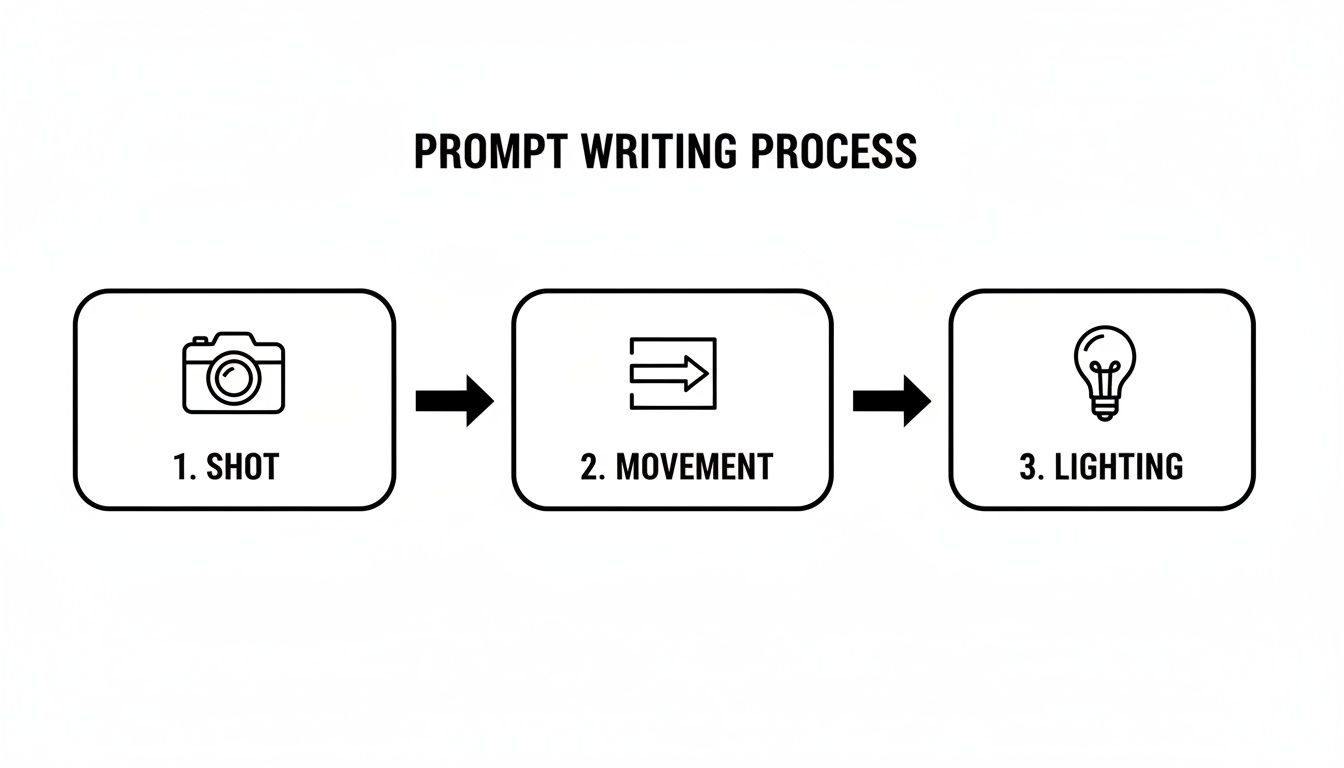
This workflow—defining the shot, adding movement, and then layering in the lighting—is the foundation for every solid prompt you'll write in your storyboard.
Walkthrough: A 30-Second Product Ad Storyboard
Let's put this all into practice. Here's a quick storyboard for a 30-second ad for a fictional brand of noise-canceling headphones called "Aura." The goal is a punchy video that would work perfectly as a Sora 2 for TikTok ad.
To map it out clearly, I've put the plan into a table format. This is a great way to organize your own projects before you even start prompting.
| Sample 30-Second Product Video Storyboard | | :--- | :--- | :--- | :--- | | Time (Seconds) | Scene Description & Shot Type | Narrative Goal | Example Prompt Snippet | | 0-3 (Hook) | A fast-paced montage of chaotic city scenes: traffic, crowds, construction. Medium shots, handheld feel. | Grab attention with sensory overload. | "Dynamic montage of a bustling city street, handheld camera feel, natural morning light..." | | 4-10 (Problem) | A medium shot of a stressed person on a crowded subway, trying to focus on their laptop. The background is noisy and distracting. | Introduce the customer's pain point. | "...a young professional on a crowded subway, looking frustrated. The background is a blur of motion..." | | 11-25 (Solution) | The person puts on the Aura headphones. The shot transitions to a close-up of their relieved face. The chaotic background blurs and fades into a calm, minimalist library. The camera slowly orbits the product. | Show the product as the hero that solves the problem instantly. | "...cinematic close-up as they put on sleek, matte black Aura headphones. The background softly transitions to a serene, quiet library. Slow orbital shot..." | | 26-30 (CTA) | An elegant product shot of the Aura headphones on a clean, modern surface, with the brand logo subtly appearing. | Reinforce the brand and leave a lasting impression. | "...a hyperrealistic product shot of the Aura headphones on a white marble table. Soft, clean studio lighting. The 'Aura' logo gently fades in..." |
See how that works? This structured approach elevates the Sora 2 text-to-video feature from a fun toy into a serious narrative tool. When you take the time to plan your scenes, maintain consistency, and follow a classic storytelling arc, you can create product videos that don't just look good—they actually perform and drive results for your business.
Optimizing Your AI Videos for Maximum Conversion
Alright, you’ve used the Sora 2 product video generator to create a stunning video. That's a huge win, but don't pop the champagne just yet. The real work—the part that actually drives sales—starts now. This final step is all about optimization. It’s about turning a cool-looking clip into a high-performance asset that gets people to click, engage, and buy.
Think about it: a video that crushes it on a Shopify product page will likely bomb on TikTok. Every platform has its own rhythm, its own unspoken rules. If you ignore them, you're just leaving money on the table.
Tailoring Videos for Each Platform
Your first move is to think about where your video will be seen. The goal is to make your content feel like it belongs there, not like a clunky ad that interrupts the experience.
For Shopify Product Pages:
- Aspect Ratio: You’ll want to stick with 1:1 (square) or 4:5 (vertical). These formats fill up more of the screen on a phone, which is where most people are shopping anyway.
- Content Focus: Get straight to the point. Show the product from every angle, highlight its best features in action, and give a real sense of its quality. This video should work as a living, breathing version of your best product photos.
- Audio: Plan for silence. Most people will watch with the sound off, so use clean text overlays to spell out the key benefits and features.
For TikTok and Instagram Reels:
- Aspect Ratio: This is non-negotiable: 9:16 (full-screen vertical) is the only way to go. Anything else looks instantly amateur and gets ignored by the algorithm.
- Content Focus: The hook is everything. You have 2-3 seconds to grab someone's attention. Start with your most visually stunning, surprising, or curious scene right at the beginning.
- Audio: Here, sound is king. Use trending audio or music that you find directly in the app. This simple trick can massively boost your organic reach and make your video feel native to the platform.
Here’s a pro tip: Use the Sora 2 storyboard generator to create one "hero" video. Then, quickly create different versions for each platform. Just tweaking the aspect ratio and swapping the first few seconds can make a world of difference in performance.
Mastering Export Settings and Deployment
Once you’ve got your platform-specific edits done, a clean export is crucial. You want your video to look sharp and professional, no matter the device. For pretty much any web or social media use, these settings are your go-to.
- Resolution: 1080p (1920x1080) is the perfect balance between high quality and manageable file size.
- Frame Rate: 30 frames per second (fps) is the standard for digital video.
- Format: MP4 with the H.264 codec is the universal language of video—it works everywhere.
With your exported files ready, the real fun begins: testing. Never just post one video and call it a day. The beauty of a tool like the Sora 2 product video generator is how quickly and cheaply you can spin up multiple variations to test.
It's no surprise some are calling Sora 2 the 'TikTok of AI.' It's incredibly good at making content that just feels right for social media. It shot up the US download charts right after launch because it plugs directly into the recommendation algorithms that create viral hits. Its specialty is churning out 30-60 second clips with believable physics and a social-first feel, making it perfect for platforms like YouTube Shorts—which, by the way, a third of UK consumers watch daily. If you want to go deeper on this, you can discover more insights about Sora 2's social media disruption.
A/B Testing for Higher ROI
A/B testing is just a fancy way of saying you compare two versions of something to see which one wins. It’s how you stop guessing and start making data-driven decisions about what your audience actually wants to see.
Here are a few dead-simple A/B tests you can run with your Sora 2 for ecommerce and product videos:
- Test Different Hooks: Make two videos with different opening scenes. Does a dramatic close-up of the product work better than a shot of someone using it?
- Vary the Call-to-Action (CTA): Try different text on your end screen. Does "Shop Now" get more clicks than "Learn More"?
- Experiment with Length: Pit a punchy 15-second version against a more in-depth 30-second video. You might be surprised which one performs better.
When you make this kind of optimization and testing a regular part of your process, you're not just making videos anymore. You're building a powerful sales funnel that turns your Sora 2 creations into measurable drivers of real business growth.
Common Questions About Using Sora 2 for Products
Jumping into a powerful tool like the Sora 2 product video generator is exciting, but it's natural to have questions. You're not just learning a new piece of software; you're figuring out how to fit a whole new creative process into your workflow.
Let's clear up some of the most common questions we hear from brands and creators. The goal here is to give you practical, no-nonsense answers so you can get back to making amazing videos.
How Do I Ensure Brand Consistency Across My Videos?
This is a big one. You don't want your AI-generated videos to look like they came from a dozen different brands. The secret is building a "brand prompt template" to use as a starting point for every single video.
Your template should lock in the core elements of your visual identity:
- Color Palette: Don't just say "blue and gold." Be specific with hex codes, like `"a palette of navy blue (#001f3f), gold (#ffd700), and crisp white (#ffffff)."
- Lighting Style: Define the mood. Are you
"bright, clean, minimalist lighting"or more"dramatic, moody side-lighting"? - Overall Atmosphere: Use words that echo your brand's voice. Think
"an elegant and luxurious atmosphere"versus"a playful and energetic vibe."
For an extra layer of control, I highly recommend using the image-to-video feature. Feed it a reference image that perfectly captures your brand's aesthetic. When storyboarding, just tell Sora 2 to maintain the subject and style from the previous scene—it does a great job of keeping things consistent.
What Are the Current Limitations of Sora 2?
Sora 2 is a powerhouse, but it's not magic. Knowing its weak spots helps you work around them instead of fighting against them.
Right now, the model can sometimes get tripped up by complex physics or keeping track of objects in 3D space. You might see a hand momentarily pass through a table, for example. It's also not great at generating crisp, readable text directly in a video. The AI is very literal, so if your prompt is even slightly ambiguous, you might get some bizarre results.
Think of Sora 2 as your expert cinematographer, not your graphic designer. It’s brilliant at creating the visual scene, but you'll still want a dedicated video editor for adding that perfect text overlay or high-res logo in post-production.
Can I Create Videos Longer Than 60 Seconds?
Sora 2's sweet spot is short-form content—it’s optimized for clips up to 60 seconds long. This makes it perfect for the kind of high-impact videos that perform well on social media.
But what if you need something longer, like a tutorial or brand story? The best way to tackle this is to think in modules. Use the Sora 2 storyboard generator to generate a series of connected 60-second scenes, then simply stitch them together in your favorite video editor. It's a straightforward workaround that lets you build longer narratives without sacrificing quality.
Many AI video tools face similar questions. If you're curious about general user concerns across platforms, checking out Soreel's frequently asked questions can offer some broader context.
How Well Does Sora 2 Handle Different Materials?
Sora 2 is fantastic at rendering realistic materials, but it needs your help. The richness of the final video is directly tied to the richness of your description.
Don't just ask for a "metal watch." Get specific. Try something like, "macro shot of a brushed stainless steel watch with a polished chrome bezel, reflecting soft studio lighting." The difference is night and day.
The same goes for fabrics. Instead of "wool sweater," describe the texture: "a close-up of a soft, chunky-knit merino wool sweater, showing the individual fibers." Using sensory language helps the AI nail the texture, reflectivity, and the way light plays off a surface, making your product feel real enough to touch.
Ready to turn your product ideas into cinematic videos? With saro2.ai, you can start creating with our Sora 2-style models today. No waitlist, no invite code required. Begin generating high-impact product videos now at https://saro2.ai.