Sora 2 Explainer Video Generator: Create Viral AI Marketing
Explore how the sora 2 explainer video generator can turn ideas into engaging AI marketing videos. A concise, actionable guide to create stunning visuals.
The days of blowing your budget and calendar on a single explainer video are officially behind us. With a Sora 2 explainer video generator, marketers and creators can now spin up professional, high-quality clips from a few lines of text. This completely removes the old hurdles of hiring production crews or wrestling with complicated software.
The New Reality of AI Explainer Videos

The entire process of making a great video has been turned on its head. What used to take a team of specialists, a room full of expensive gear, and weeks of back-and-forth can now be done in minutes, right from your phone or laptop. This isn't just a minor improvement; it's a massive shift in accessibility and speed, finally letting smaller businesses and solo creators punch above their weight.
The Sora 2 text-to-video model has fundamentally changed how we think about creating short explainer videos. Instead of needing cameras and editing suites, you just need a good prompt.
Sora 2 is built on a Diffusion Transformer architecture, allowing it to generate incredibly realistic 10-second clips that come with audio, music, and even personalized "Cameo" inserts. It learned its craft from massive datasets, fine-tuned with automated captioning and prompts generated by GPT-4o. The result is a model that understands complex instructions and delivers impressive visual quality.
A Social-First Design
Let's be real: modern video tools have to feel intuitive and be built for the platforms where people actually are. The Saro2.ai platform was clearly designed with a social-first mindset. Its interface feels a lot like scrolling through TikTok, which makes the whole creation process feel familiar and incredibly fast.
Here’s why that’s a game-changer:
- Intuitive Creation: The learning curve is practically zero. If you know how to use social media, you already know how to generate a video here.
- Rapid Iteration: You can test out different Sora 2 prompts, visual styles, and concepts on the fly to quickly figure out what clicks with your audience.
- Built-in Shareability: Videos are created in formats that are already optimized for social feeds, so exporting and publishing is a breeze.
The technology behind this is truly setting new standards in the industry. You can learn more about the foundational model by exploring OpenAI's Sora.
To give you a clearer picture, here’s a quick breakdown of what makes a Sora 2 style model so effective for explainers.
Sora 2 Explainer Video Features at a Glance
| Feature | Benefit for Explainer Videos | Example Use Case |
|---|---|---|
| Sora 2 Text-to-Video | Instantly visualize complex ideas or product features without any filming. | "An animated clip showing how our app's new scheduling feature works." |
| Image-to-Video | Bring static product photos or mockups to life with subtle motion and effects. | Turning a static image of a new sneaker into a dynamic 360-degree view. |
| Sora 2 Storyboard Generator | Plan and generate a complete narrative sequence for a cohesive story. | Creating a 3-scene ad: problem, solution (your product), happy customer. |
| Personalized 'Cameos' | Insert a user-uploaded face into the video for a highly personalized touch. | Adding a customer's face to a testimonial video for a "wow" effect. |
| AI-Generated Audio & Music | Automatically adds a suitable soundtrack and sound effects to match the video's mood. | Generating an upbeat, energetic track for a product launch announcement. |
These features work together to give you a powerful toolkit for creating content that used to be out of reach for most.
Key Takeaway: The real power of the Sora 2 video generator is that it makes video production accessible to everyone. It doesn't matter what your technical skills or budget look like—you can now take an idea and turn it into a compelling visual story that’s ready for any platform. This guide will show you exactly how.
Bringing Your Core Message to Life with a Storyboard
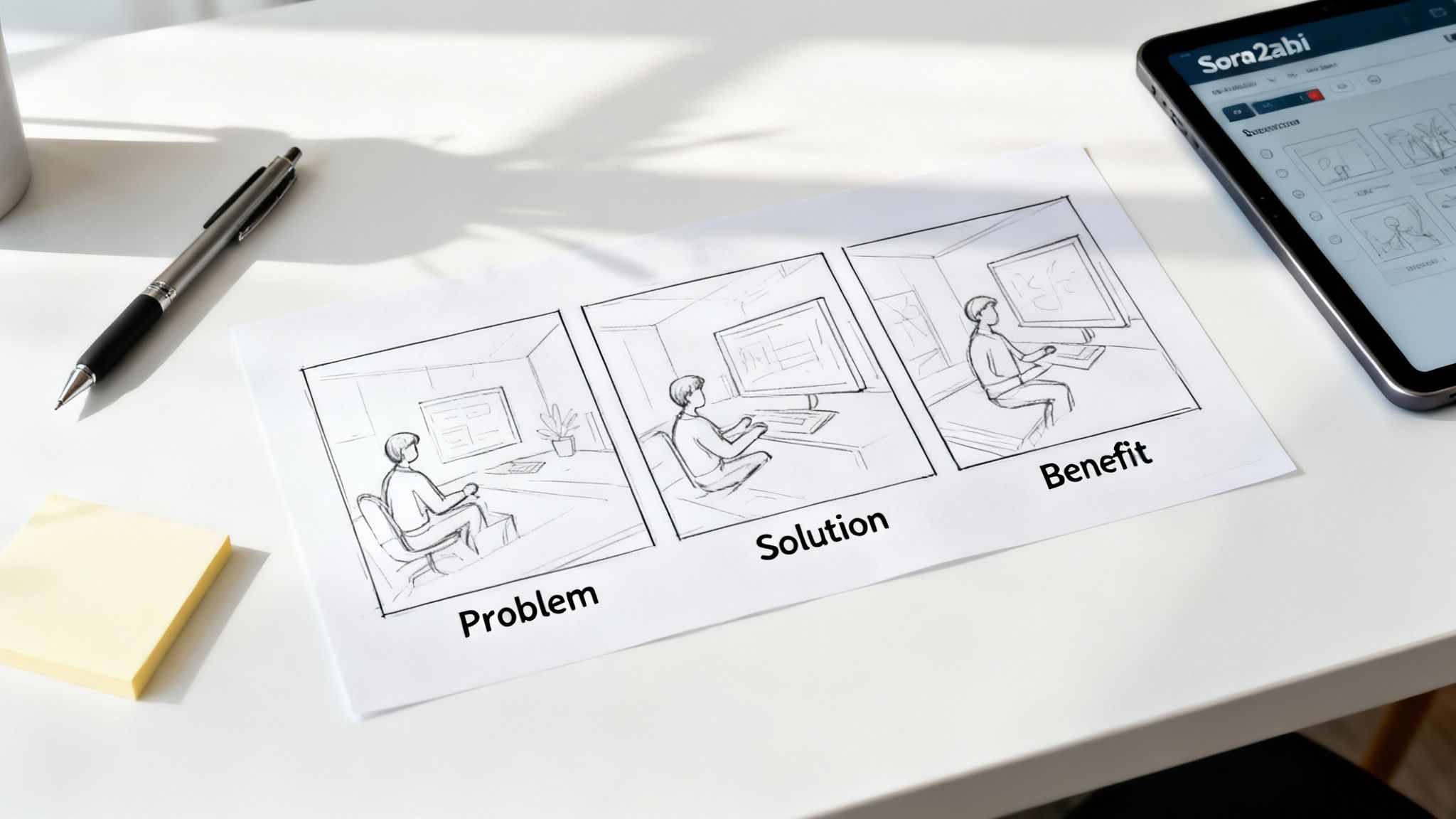
Before you even think about generating a single clip, you need a plan. A truly great AI video isn’t just a random collection of cool-looking scenes; it tells a story with a beginning, middle, and end. The best way to get this right is by starting with a storyboard.
Think of it as the blueprint for your video. It’s where you break your big idea down into individual scenes, making sure the final cut is not just pretty, but persuasive.
For explainer videos, nothing beats the classic Problem-Solution-Benefit framework. It’s a simple, powerful three-act structure that hooks the viewer by highlighting a relatable pain point, introducing your product as the hero, and then showing them the better life on the other side.
Mapping Out Your Story in Saro2
Let's walk through a practical example. Imagine you’re launching a new time-tracking feature inside a project management app. Your target audience is busy freelancers, and you want to create a short, snappy video for TikTok and Shopify ads.
You can jump right into the Saro2.ai Sora 2 storyboard generator to map this out. What’s great about this tool is it lets you plan each scene first—defining the visuals and writing the text prompt—before you burn any credits generating video.
Here’s how you’d structure your three-part story:
- Scene 1: The Problem. We need to show the freelancer's pain point. The goal is to make them say, "That's me!" Your Sora 2 prompt should focus on capturing the feeling of being overwhelmed, with sticky notes everywhere and deadlines looming.
- Scene 2: The Solution. Now, we introduce your app's new feature as the answer. The visuals need to shift from chaotic to calm and organized. You'll want to highlight the app's clean interface and how simple it is to use.
- Scene 3: The Benefit. This is the "happily ever after." We show the freelancer looking relaxed, successful, and totally in control of their time. They’re hitting deadlines and maybe even enjoying a coffee, all thanks to your tool.
This structured approach is what makes your story flow. It guides the viewer on an emotional journey from frustration to relief, which makes your product stick in their mind.
A well-planned storyboard is the single most important factor in a successful explainer video. It turns a fuzzy idea into a clear visual roadmap, saving you a ton of time and ensuring every second of footage has a purpose.
By breaking your message into these distinct parts, your prompts become much more focused and powerful. Instead of trying to explain the entire concept in one massive prompt, you're giving the AI clear, bite-sized instructions for each part of the story. This modular approach is the secret to creating a truly compelling narrative with a Sora 2 text-to-video engine.
Writing Sora 2 Prompts That Deliver Cinematic Results
The real gap between a generic, forgettable clip and a stunning, cinematic scene from a Sora 2 explainer video generator boils down to a single thing: your prompt. This is where you graduate from simply describing things to actually directing them. You need to use your words to control the camera, the lighting, and the entire mood of the shot.
If you type in "a person using a computer," you'll get exactly that—a boring, lifeless scene with no real intent. To create something that actually connects with an audience, you have to think in layers. Start with your subject, then pile on the details: the setting, how the camera should move, the quality of the light, and even the character's emotional state. That level of detail is what tells the AI how to build something genuinely compelling.
From Vague Ideas to Vivid Scenes
Let's go back to that software feature example. A vague prompt just won't cut it. We need to build a scene that actually tells part of our story, one that shows a user feeling relief and success.
Look at the difference here:
- Vague Prompt:
a person using a computer - Cinematic Sora 2 Prompt:
Over-the-shoulder shot of a designer looking relieved, using a sleek software interface on a monitor, with cinematic, soft office lighting.
The second prompt is a creative brief for the AI. It sets the camera angle ("Over-the-shoulder shot"), defines the character's feeling ("looking relieved"), specifies the action ("using a sleek software interface"), and establishes the whole vibe ("cinematic, soft office lighting"). Every one of those details pushes the AI closer to the exact narrative beat you're trying to hit.
Mastering the Language of Filmmaking
If you really want to level up your Sora 2 text-to-video generations, start borrowing terms from cinematography. Don't be shy about using technical language in your prompts—the AI gets it. Weaving these concepts into your descriptions will give you a surprising amount of control over the final look and feel.
Here are a few powerful ideas to start experimenting with:
- Camera Movements: Tell the AI exactly how you want the virtual camera to move. Phrases like
dolly zoom,crane shot,tracking shot, orhandheld shotcompletely change the energy of a scene. Atracking shotfollowing someone can give a sense of forward momentum, while adolly zoomis fantastic for building tension or highlighting a moment of realization. - Lighting Styles: Lighting is everything when it comes to mood. Be specific. Are you picturing
dramatic backlighting,soft morning light, aneon-drenchedalley, or the warm glow ofgolden hour? These details paint a much richer picture for the AI than just saying "daytime." - Emotional Cues: Directly tell the AI what you want your characters to be feeling. Use descriptive words like
contemplative,elated,anxious, orconfident. This has a huge impact on the generated facial expressions and body language, making your scenes feel so much more human.
Pro Tip: Your first prompt is almost never your best one. The real magic comes from tinkering. Generate a clip, see what you like and what you don't, and then tweak your prompt. Was the lighting a bit harsh? Add "soft, diffused lighting." Did the shot feel a little flat? Try adding "slow panning shot."
When you start thinking like a filmmaker, your Sora 2 prompts become rich, layered instructions instead of simple commands. That’s how you go from just generating random footage to crafting a memorable explainer video that actually tells a story and grabs people’s attention.
Generating and Assembling Your Sora 2 Video Examples
Now for the fun part. With your storyboard laid out and your prompts polished, it's time to actually create the video. This is where your ideas finally start moving, and the Saro2.ai platform makes this feel less like a technical task and more like a creative one.
Don't expect every clip to be perfect on the first try—that’s not how this works. Think of it as a cycle: generate, review, and refine. It’s an iterative back-and-forth until you get it right.
You'll be working primarily with the text-to-video engine. Just take each prompt from your storyboard, one at a time, and plug it into the generator. After a few moments, you’ll get a short clip back. Now, put on your director’s hat. Does it feel right? Does it match the emotion and style you were going for? If not, no big deal. Tweak the prompt and run it again.
Bringing in Your Brand Assets with Image-to-Video
Most explainer videos need to show off a specific logo, a product, or maybe an app's user interface. This is exactly what the image-to-video feature is for. You can upload a still image of your product and then use a Sora 2 prompt to bring it to life, maybe by adding some subtle movement or dropping it into a completely new scene.
Let’s say you’ve got a screenshot of your new software. You could upload it and tell the AI: Animate the user interface, showing a cursor clicking on the new 'Time-Tracker' button, with a subtle glow effect. This little touch adds a professional polish and clarity that a purely text-generated scene might struggle with.
Crafting a good cinematic prompt is all about layering different instructions for the AI, telling it about the style, the lighting, and the mood you're after.
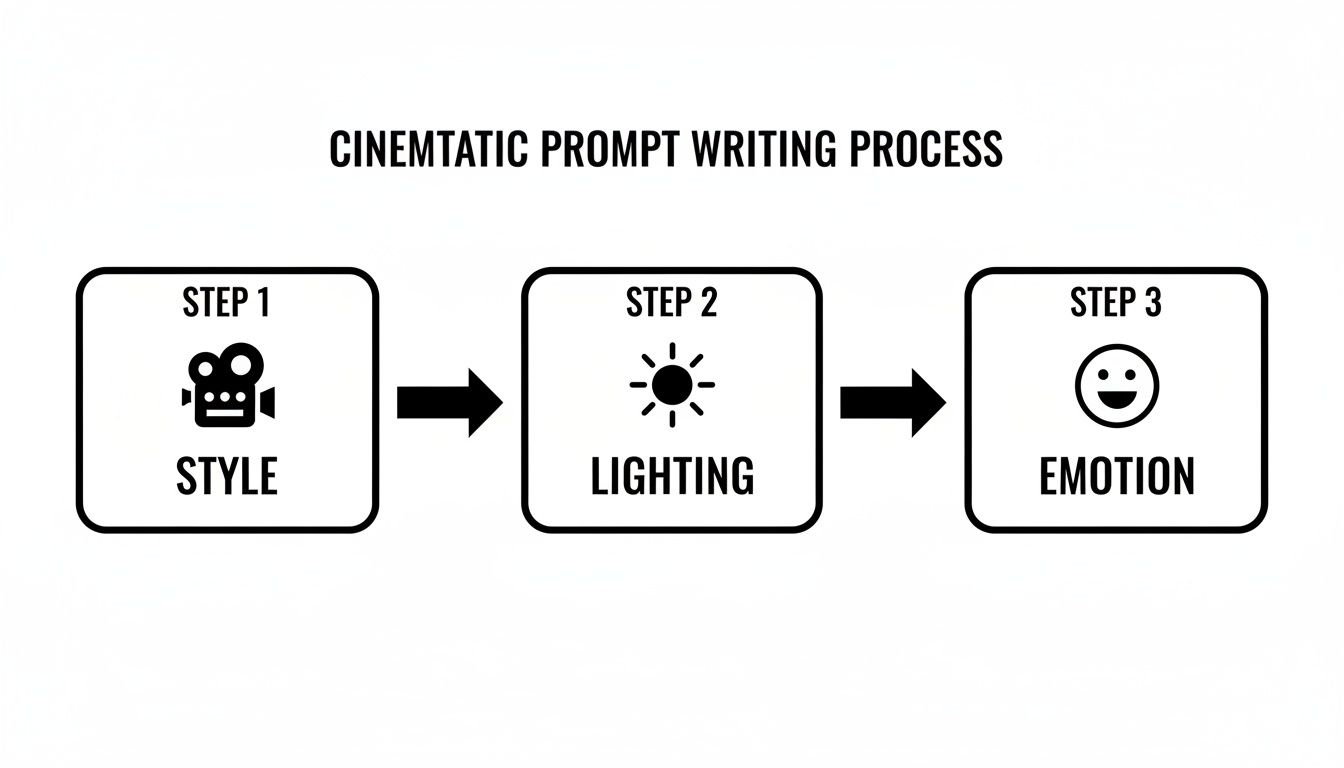
This process shows how you can combine these elements—camera work, lighting, character emotion—to turn a basic idea into something that really grabs the viewer.
Arranging and Editing Your Scenes
Once you've generated all the clips you need, the last piece of the puzzle is putting them all together. Saro2.ai has a multi-scene timeline editor built right in. You can just drag and drop your clips into the order you planned in your storyboard.
From there, you can trim the ends, shuffle the order, and check the transitions to make sure the whole thing flows together into a cohesive story.
My Two Cents: The real magic in using a Sora 2 explainer video generator is embracing the do-over. Generate a clip, see how it fits, and never be afraid to go back and regenerate it with a better prompt. This constant refinement is what separates a decent video from a great one.
This new way of creating video is why the AI video market is exploding. It’s expected to reach an incredible $2.56 billion by 2032, up from $554.9 million in 2023. We’re also seeing that 52% of short-form video creators are already relying on AI tools for their TikTok and YouTube content. If you want to dig into the numbers, this market report on AI video generators breaks it all down. It’s a clear sign of how much these tools are changing the game for everyone from solo creators to big businesses.
Using Sora 2 for TikTok Ads and Ecommerce
Creating a great-looking video is one thing, but getting it to perform where it matters is the real challenge. Your new Sora 2 explainer video needs to be shaped for the platforms your customers actually use, like TikTok and your own ecommerce store. If you don't tailor the content for each channel, you're leaving results on the table.
First things first, let's talk technical specs. For TikTok, there's no way around it: you need a 9:16 vertical aspect ratio. This fills the entire phone screen and is exactly what users expect. On the other hand, for an ecommerce product page or a grid-style feed on Instagram, a 1:1 square aspect ratio is often the safer bet. It keeps everything looking neat and tidy alongside your product photos.
Crafting for Conversion on Key Platforms
Beyond just the dimensions, the content itself needs a different approach for each platform. A video that’s perfect for a Shopify product page will probably fall flat on TikTok.
- Sora 2 for TikTok Ads: You have less than two seconds to stop someone from scrolling. That means you need to lead with your most visually stunning, attention-grabbing clip. Use big, bold text overlays to get your main point across instantly. If you can incorporate trending audio (just be sure to follow the commercial use rules), you can give your ad a serious bump in reach.
- Sora 2 for Ecommerce and Product Videos: Here, your goal isn't to go viral; it's to build trust and sell a product. Your video should show off your product from every angle, demonstrate how its best features work, and visually answer any questions a potential customer might have. Treat it like a supercharged product photo that helps someone confidently click "add to cart."
The AI video marketing strategies enabled by Sora 2 are a significant competitive advantage. The ability to rapidly generate high-quality product videos and test different ad creatives at scale was previously unthinkable for most businesses. Now, a small ecommerce brand can A/B test a dozen different video ads in a single afternoon.
Adding the Final Polish
With the technical stuff out of the way, it's time for the final touches that actually drive people to act. You absolutely need a clear Call-to-Action (CTA).
On TikTok, this could be as simple as a text overlay saying, "Shop Now with the Link in Bio!" For your Shopify page, a clean title above the video like "See It in Action" can work wonders.
The idea is to make the next step completely obvious and frictionless for your viewer. To really dig into making your videos pop off, you can explore some proven strategies to go viral on TikTok.
At the end of the day, a well-optimized video isn't just a pretty asset. It's a tool built to turn viewers into paying customers.
Frequently Asked Questions
As you get the hang of a new creative tool, you're bound to have some questions. Let's walk through some of the most common ones we hear about the Sora 2 explainer video generator and give you some real-world advice to get you started on the right foot.
Can I Use My Own Product Images in Sora 2 Videos?
You bet. This is actually one of its killer features for anyone in e-commerce. The image-to-video functionality is a total game-changer for product marketing. Just upload a clean shot of your product, and you can write a prompt to bring it to life.
Imagine you have a static photo of a new wristwatch. You could generate a video showing it on someone’s wrist while they're hiking through a sun-drenched forest. Suddenly, your product has a story and a lifestyle attached to it—something a simple product photo on your Shopify store just can't do.
What Is the Maximum Video Length I Can Create?
Each individual clip you generate with a Sora 2 style model can be up to 10 seconds long. This might sound short, but it's the sweet spot for grabbing attention on social media. When you need something longer, like a full explainer video, you'll think like a director and use the multi-scene storyboard.
You simply create a sequence of these 10-second clips, each one a different "shot" in your story. String them together, and you can easily build out a 30, 60, or even 90-second video. This modular approach gives you incredible control over the pacing and lets you tell a much richer story.
What Are Common Sora 2 Prompting Mistakes to Avoid?
The two biggest pitfalls I see are vagueness and contradiction. A prompt like "a cool video" is a recipe for a generic, forgettable clip. On the flip side, trying to jam too many conflicting ideas in—like "a minimalist, ornate, futuristic, ancient room"—will just confuse the AI and give you a visual mess.
The trick is to be specific and focused.
- Always have a clear subject, action, and setting for each scene.
- If you have a complex idea, break it down into multiple, simpler scenes.
- Tell the AI what you want, not what you don't. Positive framing works best.
Clarity is everything. If you can picture it clearly in your head, you can get the AI to generate it.
Is Sora 2 a Good Alternative to Traditional Video Production?
For most small businesses, marketers, and solo creators, it's more than just an alternative; it's a huge step up. Let's be real: traditional video production is a massive headache. It's slow, expensive, and involves juggling gear, locations, and schedules. A single project can drag on for weeks.
A Sora 2 video generator completely sidesteps that process. You can go from a simple idea in a text prompt to a finished, high-quality video in a matter of minutes, not months. While it's not going to replace a multi-million dollar film production, it’s an incredibly powerful, fast, and affordable way to create the vast majority of video content a modern business needs to thrive.
This is all about agility. You can test more ideas, react to trends faster, and produce content at a scale that was just impossible before. Platforms like Saro2.ai are strong Sora 2 alternatives that make this advanced technology accessible.
Ready to create stunning explainer videos in minutes? Start your first project with the Saro2.ai Sora 2 video generator today and see the power of AI-driven video generation for yourself. Create Your Free Explainer Video Now